What Features Should a Content Automation Platform Have?
The 10 content automation platform features that matter, what strong and weak versions look like, and the demo questions that expose the difference.


Most content automation platforms sell you the same three things: AI writing, a scheduler, and a content calendar. Every vendor has them, so they tell you almost nothing. The content automation platform features that decide whether a tool saves you hours (or just invents a new kind of busywork) are the ones underneath: where content starts, whether it sounds like you, and whether the whole thing keeps running when nobody is babysitting it.
This is a buyer's checklist. Ten feature categories, what a strong version looks like, what a weak one looks like, and the question to ask in a demo that exposes the difference. Read it before your first sales call, not during it.
First, a working definition.
A content automation platform is software that takes you from raw ideas to published posts on every channel, handling capture, drafting, review, scheduling, and measurement as one connected workflow.
That last part is where most tools fall short. Plenty of products automate one step. Few connect them.
And the gap shows. In the Content Marketing Institute's B2B Content and Marketing Trends: Insights for 2026 survey of more than 1,000 B2B marketers, about 9 in 10 said they already use AI to create content. Fewer than 4 in 10 said it has actually improved performance. Access to AI isn't the problem anymore. The workflow around it is.
What features should a content automation platform have?
Here is the short version before we go one by one.
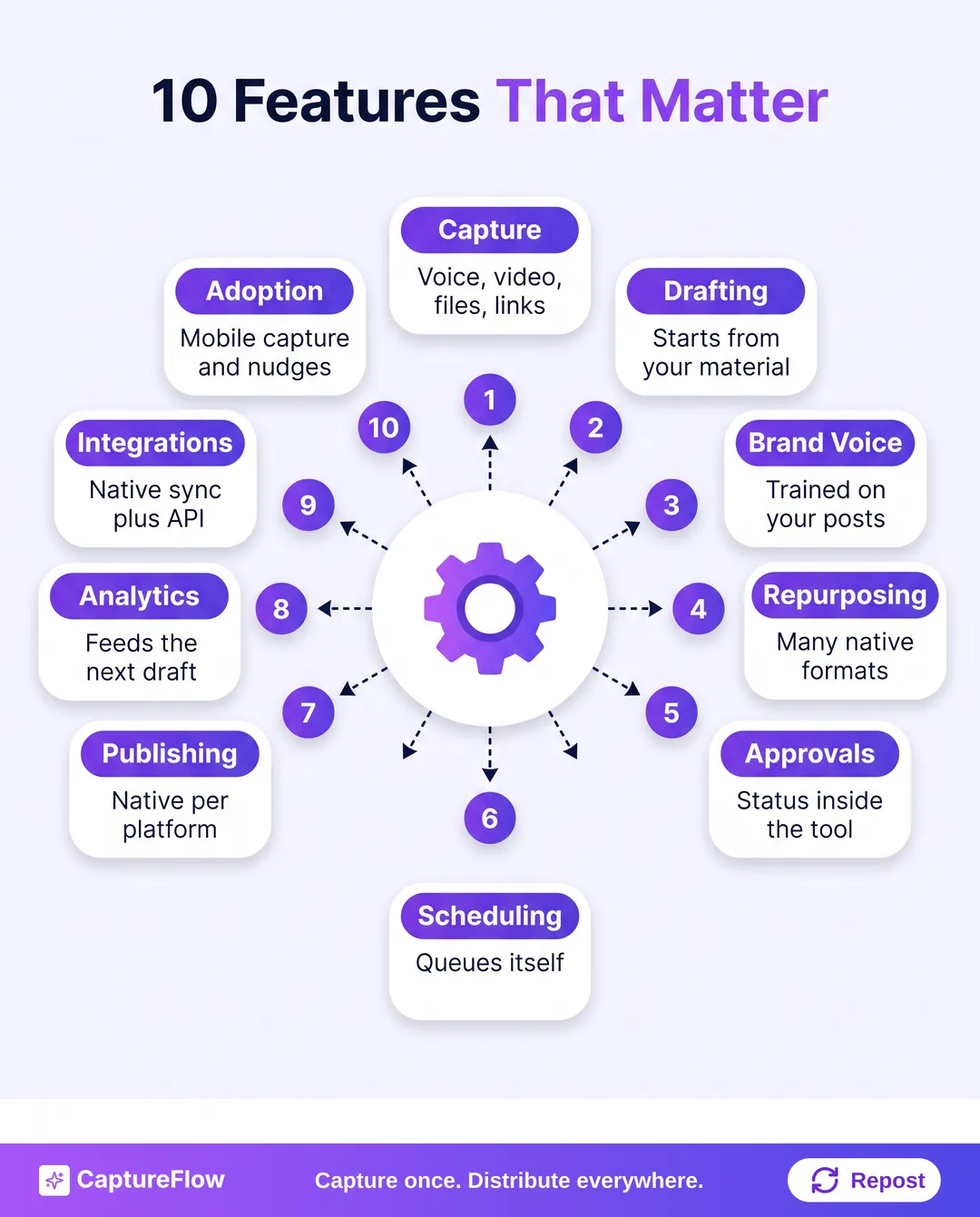 The ten feature categories that separate a real content automation platform from a pile of tools.
- Multimodal capture
- Drafting from your own material
- Brand voice trained on your posts
- Repurposing into many native formats
- Review and approval
- Scheduling that runs itself
- Native cross-platform publishing
- Analytics that feed back into drafting
- Integrations and an API
- Features that drive team adoption
1. Capture: where every piece of content starts
Most platforms treat the blank editor as the starting line. The good ones start one step earlier, at capture.
Your expertise doesn't live in a text box. It lives in sales calls, voice notes you record on a walk, conference talks, Loom videos, and the PDF you wrote for a client last spring. If a platform can't take those in, you end up translating your own thinking into a prompt by hand. Which is the exact job you wanted to hand off.
- Strong: accepts video, audio, images, PDFs, documents, links, and plain text as equal inputs. Transcribes accurately enough to draft from. Pulls out the two or three ideas worth posting instead of handing you a 3,000-word transcript.
- Weak: a text box that asks you to paste something you already wrote, or upload that works for one format and nothing else.
- Ask in the demo: "Here's a 4-minute voice note I recorded this morning. Can you turn it into drafts right now?"
This is the idea behind capture-first content, and it's why multimodal capture sits at the front of our own product. If you mostly talk through ideas on calls, our guide to turning meeting recordings into content shows the workflow end to end.
2. Drafting from your material, not from a blank prompt
AI writing is table stakes. What matters is what the AI starts from.
A blank-prompt assistant is a chatbot with a calendar bolted on. You still decide what to say, frame the argument, and write the hook; the tool formats the result. We wrote a whole piece on why ChatGPT alone stalls out for exactly this reason.
A content agent works differently. It reads your captured material, finds the sharpest points, and drafts platform-native posts without you writing a prompt at all.
- Strong: drafts come from your capture, you get several format options from one input, and you can talk to the agent to refine a draft rather than hitting regenerate.
- Weak: a prompt box asking "What do you want to write about?", output you'd rewrite 80% of, one draft per input.
- Ask in the demo: "Show me the output from a raw recording before anyone on your team touches it."
Bring your own material to every demo. Vendors rehearse with inputs they know work. A messy 10-minute voice memo of yours tells you more in five minutes than an hour of their slides.
3. Brand voice: trained on your posts, not picked from a dropdown
Get this one wrong and nothing else matters. If the output doesn't sound like you, the people who follow you for your point of view will notice fast.
There's research behind the worry. In a 2024 Science Advances study, Anil Doshi and Oliver Hauser found that writers given AI-generated ideas produced stories rated as more creative individually, but the stories became more similar to each other. The University of Exeter's summary puts it at a 10.7% jump in similarity for writers who used one AI idea. Generic AI pulls everyone toward the same middle. Voice training is how you push back.
- Strong: learns from your real past posts and uploaded writing samples, keeps a separate voice per person or brand, and gets sharper every time you approve or edit a draft.
- Weak: a tone selector with "professional", "casual", and "witty". Or a one-time onboarding questionnaire that never updates.
- Ask in the demo: "What exactly does the AI train on, and does it keep learning after setup?"
CaptureFlow handles this with a private voice and knowledge base. For the hands-on version, see how to train AI on your brand voice.
If you would rewrite most of the demo output to make it sound like you, you are paying for a slightly smarter text box.
4. Repurposing into native formats, not shorter copies
"Repurposing" is one of the most overused words in this category. A lot of tools that claim it are really trimming a LinkedIn post until it fits on X. That's a character counter, not repurposing.
Real repurposing pulls several distinct ideas from one input and reshapes each into the format its platform rewards. A 20-minute podcast episode should be able to become a LinkedIn text post, a carousel with a different angle, a short captioned video clip, a quote image, and an X thread. Each one stands alone.
| Format | What good output looks like |
|---|---|
| Text post | A platform-native hook, body, and close for LinkedIn, X, or Threads |
| Carousel | 6 to 10 slides with an actual narrative arc, not transcript bullets |
| Short video | The sharpest 30 to 60 seconds, captioned and cut vertical |
| Quote image | One strong line from your own words, designed to share |
| Infographic | A structured visual summary of a list-heavy or data-heavy idea |
- Ask in the demo: "Show me every format you can produce from one 10-minute recording." Then ask whether the platform picks formats based on the content or makes you choose every time.
If this is the feature you care about most, content atomization goes deeper on how one idea becomes many posts, and the content formats page lists what CaptureFlow produces.
5. Review and approval without an email chain
Solo founders review their own drafts. Teams and agencies are a different story, and the approval step is where most content operations quietly break: feedback scattered across Slack DMs, Google Docs, and email, nobody sure which version is final.
- Strong: every draft has a visible status (draft, in review, approved, scheduled, published), a clear review queue, a revision history, and approved posts flow straight into the schedule.
- Weak: approvals happen outside the tool, there's no status tracking, and somebody has to chase people to find out what's cleared.
- Ask in the demo: "Walk me through what happens when a reviewer asks for changes. How many clicks until it's back in the queue?"
Agencies should push harder. Ask to see the review flow across five client workspaces at once, because that's the real day. Our piece on content workflow automation for agencies covers what that setup needs.
6. Scheduling that runs on its own
The scheduler is the most commoditized feature on this list. Dedicated schedulers like Buffer are genuinely good at it, with clean calendars and years of polish. Our roundup of social media scheduling tools gives them their due.
But a scheduler queues posts you already wrote. It never writes them. The question for a content automation platform is how little manual effort sits between "approved" and "live."
- Strong: a single calendar across every platform, drag-and-drop rescheduling, and automated routines that create and queue drafts on a set cadence, not just publish them.
- Weak: scheduling that's a separate module from creation, so every approved post needs a human to drag it onto the calendar.
- Ask in the demo: "Count the manual steps from an approved draft to a scheduled post."
If the answer is more than one, you've automated creation but not distribution. Half a solution.
7. Native cross-platform publishing, not broadcasting
Posting the identical message to six networks at once isn't cross-platform publishing. It's broadcasting, and it tends to underperform everywhere. LinkedIn readers expect a different post than X readers do; TikTok wants vertical, direct-to-camera video; Pinterest wants something visual enough to save.
- Strong: a separate, natively formatted version per channel, direct integrations with the platforms your audience actually uses (LinkedIn, X, Threads, Instagram, TikTok, Facebook, YouTube, Pinterest), and media handled per platform.
- Weak: one post copied everywhere, two or three supported networks with the rest "coming soon," or publishing that relies on phone reminders to post manually.
- Ask in the demo: "Which platforms do you publish to through official integrations, and which need a workaround?"
That last question matters more than it sounds. Workarounds break when a platform changes its rules. CaptureFlow's approach is one click to every network in its native format.
8. Analytics that feed back into what you make next
Most teams publish into a void. They know how many posts went out and not much else. Analytics should answer one question: what should we do differently next week?
- Strong: one dashboard across every platform, post-level numbers, comparisons by format and topic, and a loop where your best performers inform future drafts.
- Weak: platform-level totals only, a separate analytics tab disconnected from creation, no way to see which formats work for you.
- Ask in the demo: "Show me a real account, not a demo account. What's the one insight this data gives me?"
If the vendor can't surface something useful from messy real data in a couple of minutes, the dashboard is decoration.
9. Integrations and an API
Your content operation already has tools: a meeting recorder, a cloud drive, Slack, a project tracker. A platform that can't plug into them creates a second workflow your team has to maintain next to the first one. That's not automation. It's a second job.
- Strong: native integrations that auto-import recordings and files, two-way sync with the tools you already use, a documented API, and MCP support so AI assistants can work with your content.
- Weak: a Zapier connection listed as "integrations," one-way data push only, no API.
- Ask in the demo: "Which integrations are native and which depend on Zapier? Can I see the API docs?"
You can see how we've approached this on our integrations page.
10. Team adoption: the feature nobody demos
A platform your team doesn't use doesn't work, however good the features look on paper. And underused software is the norm. Gartner's 2023 Marketing Technology Survey found marketers were using just 33% of their martech stack's capabilities, down from 42% the year before and 58% in 2020. (The figure is a few years old and self-reported, but nobody I know thinks the trend has reversed.)
Contribution is just as thin. CMI's 2026 research found that 96% of B2B marketers say their organization creates thought leadership, yet in many companies fewer than 5% of employees contribute to it.
The fix isn't more training. It's less friction.
- Strong: a new person gets from signup to a first approved post in one sitting, capture works from a phone, streaks and nudges keep people consistent without a manager chasing them, and roles keep contributors, reviewers, and admins in their lanes.
- Weak: a full day of setup, desk-only capture, one shared login for everyone.
- Ask in the demo: "What happens when someone on my team misses a week?"
One more question for every vendor: "What does a typical customer's week look like six months after signup?" A good answer is boring and specific. A vague one means they've optimized for the sale, not the habit.
How to score content automation platforms side by side
Use the same scorecard in every demo. The right choice usually becomes obvious by the third call.
| Feature | What to look for | Red flag |
|---|---|---|
| Capture | Video, audio, files, links, and text as equal inputs | Text box only |
| Drafting | Drafts from your captured material | Blank prompt box |
| Brand voice | Trained on your past posts, keeps learning | Tone dropdown |
| Repurposing | Several native formats from one input | Same text, shortened |
| Approvals | Status tracking inside the tool | Feedback lives in email |
| Scheduling | Approved posts queue automatically | Manual queue for every post |
| Publishing | Native integrations, per-platform formatting | One post broadcast everywhere |
| Analytics | Cross-platform, post-level, feeds drafting | Platform totals only |
| Integrations | Native sync plus API and MCP | Zapier-only |
| Adoption | Mobile capture, nudges, roles | Full-day setup, shared login |
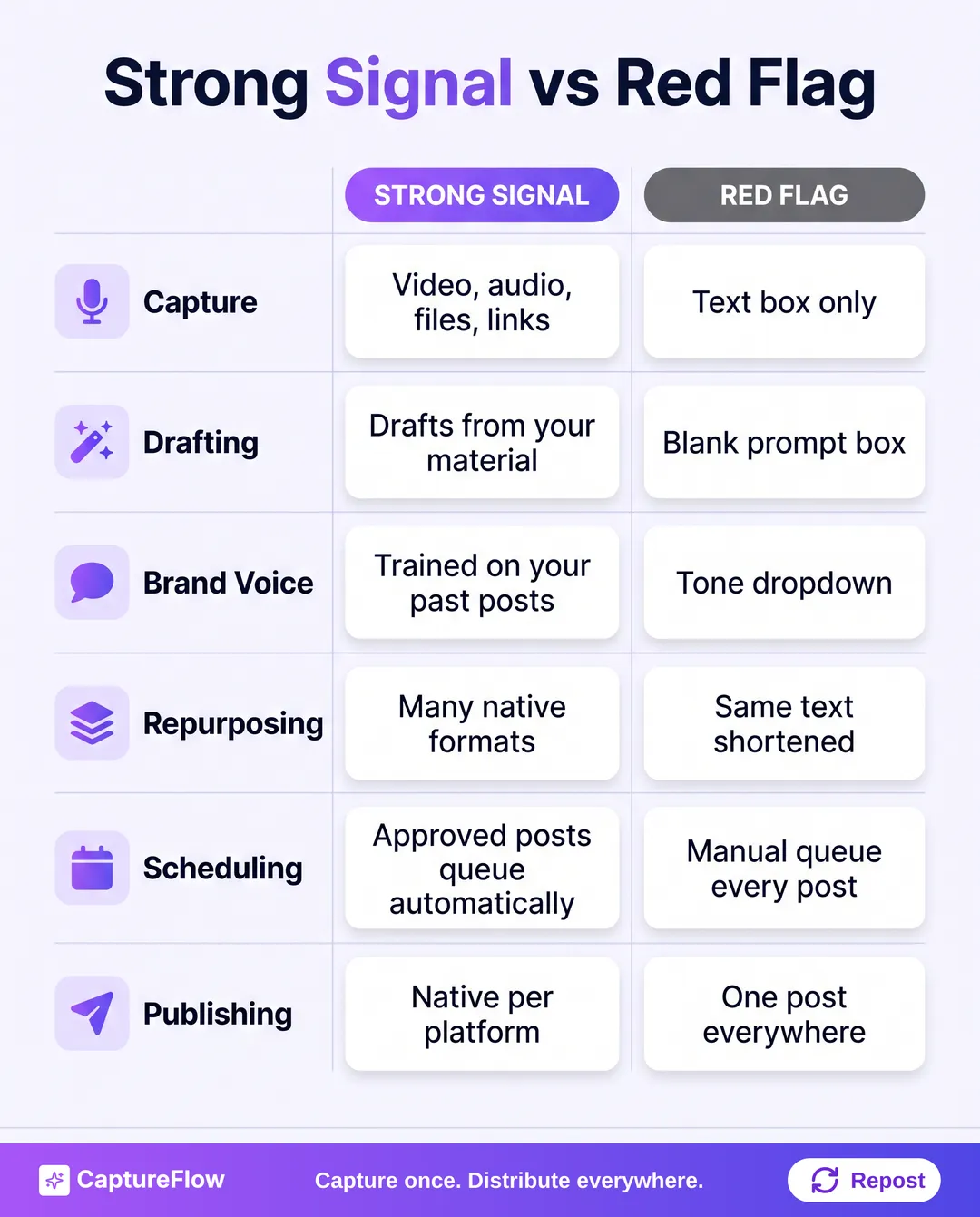 Print this, or keep it open in a tab during demos.
The platforms that score well across all ten aren't the ones with the longest feature list. They're the ones where each feature hands off to the next: capture feeds drafting, drafting feeds review, review feeds the schedule, and analytics feed back into what you capture next.
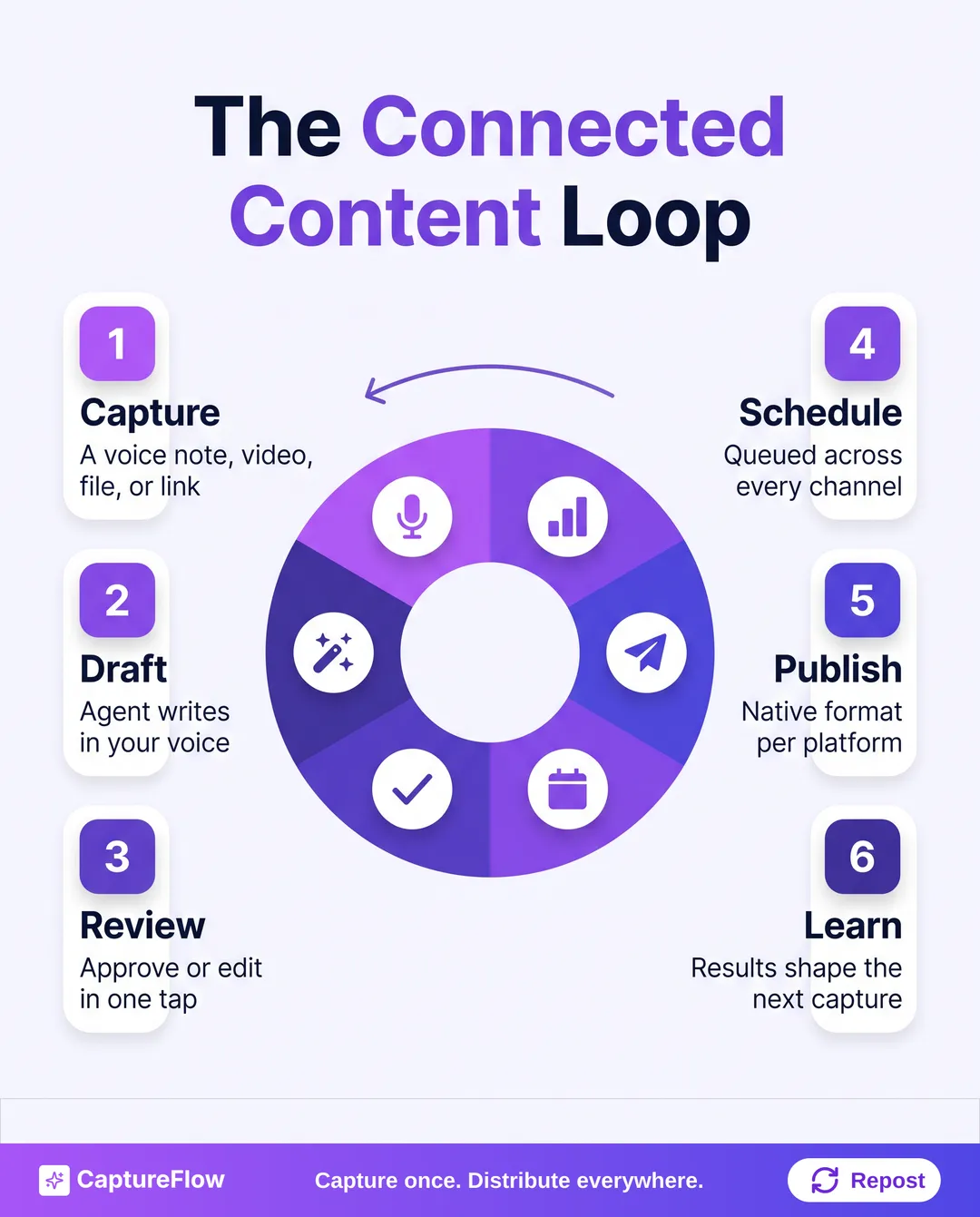 A connected platform runs as a loop. A stack of separate tools runs as a relay with dropped batons.
Where CaptureFlow fits
I'll be upfront about the bias: we built CaptureFlow around this checklist. CaptureFlow is an AI content agent that turns your expertise into weeks of on-brand content for every platform. You capture one idea in about 5 minutes (a voice note, a video, a file, or a link), and CaptureFlow, trained on your voice and past posts, reshapes it into native content for each channel: a LinkedIn post, an X thread, a carousel, an infographic, a short video, and more. You review it, or leave it to your agent, and it schedules weeks of content for you.
That doesn't make it the right pick for everyone. If you already write every post yourself and only need a calendar, a dedicated scheduler is simpler and cheaper. If you want the whole loop handled, from the voice note to the published post, take the scorecard above into a demo with us and with anyone else you're considering.
Start with the full CaptureFlow feature set, or go straight to pricing to see what each plan includes.
Sources
- Content Marketing Institute and MarketingProfs, B2B Content and Marketing Trends: Insights for 2026 (AI use for content, performance gains, thought leadership contribution).
- Gartner, 2023 Marketing Technology Survey press release (33% martech utilization).
- Doshi and Hauser, Generative AI enhances individual creativity but reduces the collective diversity of novel content, Science Advances, 2024.
- University of Exeter, AI found to boost individual creativity, but results in less varied content (10.7% similarity figure).
Frequently asked questions
What features should a content automation platform have?+
Ten matter most: multimodal capture, drafting from your own material, brand voice training, multi-format repurposing, a review and approval flow, automated scheduling, native cross-platform publishing, analytics that feed back into drafting, integrations with an API, and features that keep a team using it.
What is the difference between a content automation platform and a social media scheduler?+
A scheduler queues posts you already wrote. A content automation platform also handles the steps before that: capturing your ideas, drafting platform-native posts in your voice, and routing them through review, so scheduling is the last step of one connected workflow.
How do I test a content automation platform in a demo?+
Bring your own raw material, such as a 10-minute voice note or a meeting recording, and ask the vendor to run it through live. Judge the unedited output, count the manual steps from capture to scheduled post, and ask which platforms publish through native integrations.
Is a content automation platform worth it for a solo founder?+
It is if the platform removes the writing step, not just the posting step. A solo founder's bottleneck is turning ideas into finished posts, so look for capture, voice training, and an agent that drafts for you, then let scheduling run on its own.
Chris is the founder and CEO of CaptureFlow, which he builds so founders can turn their expertise into content without hiring a team. After 10+ years building products and growing audiences from scratch, he writes about founder-led content, AI, and distribution from inside the problem he is solving: distributing consistent, on-brand content as a team of one.
Founder & CEO of CaptureFlow · 10+ years building products and audiences
One playbook a week from founders who actually create and distribute lots of content. No spam, unsubscribe anytime.
Keep reading

How to Turn a Slide Deck Into Social Content (No Video Needed)
Your old pitch decks and conference talks are a content backlog, not an archive. Here is how to mine one deck for a week of posts without ever turning on a camera.
How to Repurpose Podcast Clips, Voice Memos, and Automate Social Content: One System for Founders
Your podcast episode and the voice memo you recorded on the train are the same raw material. Here is one system that turns both into a week of native posts, then distributes them for you.

The Weekly Content Workflow for a Small Marketing Team
Most small B2B teams do not have a content problem. They have a workflow problem. Here is the repeatable week that fixes it.