How to Turn a Slide Deck Into Social Content (No Video Needed)
Turn a slide deck into social content without recording a video: mine it for a carousel, 5 to 8 text posts, and one long-form post in a 90-minute session.


You have a folder of slide decks you'll never open again. Pitch decks, conference talks, a client workshop, the internal training you gave last spring. Each one took hours of real thinking, and almost none of it has been seen by anyone outside the room. The fix: you can turn a slide deck into social content without recording a single video, because the deck already did the hard part. You just have to extract it.
This playbook shows how. Three extraction methods, one 90-minute session, roughly a week of posts.
Here's the definition I work from.
A slide deck is a pre-sequenced, pre-edited content library: every section header is a post idea, every framework slide is a carousel card, and every punchy line you wrote to land a point is a text post waiting to go live.
Most people treat a deck as a deliverable. You present it, it gets archived, done. That's the mistake. The ideas in it were good enough to stand in front of a room for; they're good enough for a feed.
The system at a glance
Before the steps, here's the whole thing in one view:
- Qualify the deck. Only mine the ones built on your own thinking.
- Method 1: Carousel. Lift the self-contained slides into a 6 to 10 slide carousel.
- Method 2: One-liners. Pull the sharpest sentence from each section and build a text post around it.
- Method 3: The arc. Compress the deck's narrative into one long-form post.
- Run it as one session. 90 minutes, then schedule the week.
None of these steps need a camera. That matters if you're the kind of founder who'd rather write a 3,000-word strategy doc than film a 60-second clip of your own face. (Plenty of us.)
Step 1: Decide which decks are worth mining
Not every deck deserves the effort. A deck stuffed with stock photos and bullets copied from a vendor brief has nothing in it that's yours. You're hunting for decks built on your own thinking.
A deck is worth mining if it passes at least one of these:
- You built the framework. It contains a model, process, or system you developed, not someone else's methodology with your logo on it.
- It argues something. The deck takes a position that pushes against a common assumption in your industry.
- It came from a real problem. A client proposal, a training session, or a strategy doc grounded in work you actually did.
- People asked for the file. If someone said "can you send me that deck?" after you presented, the ideas landed.
Conference talks and webinar decks are usually the richest seam. You built them to persuade a room of strangers, and that's exactly the job a public post does.
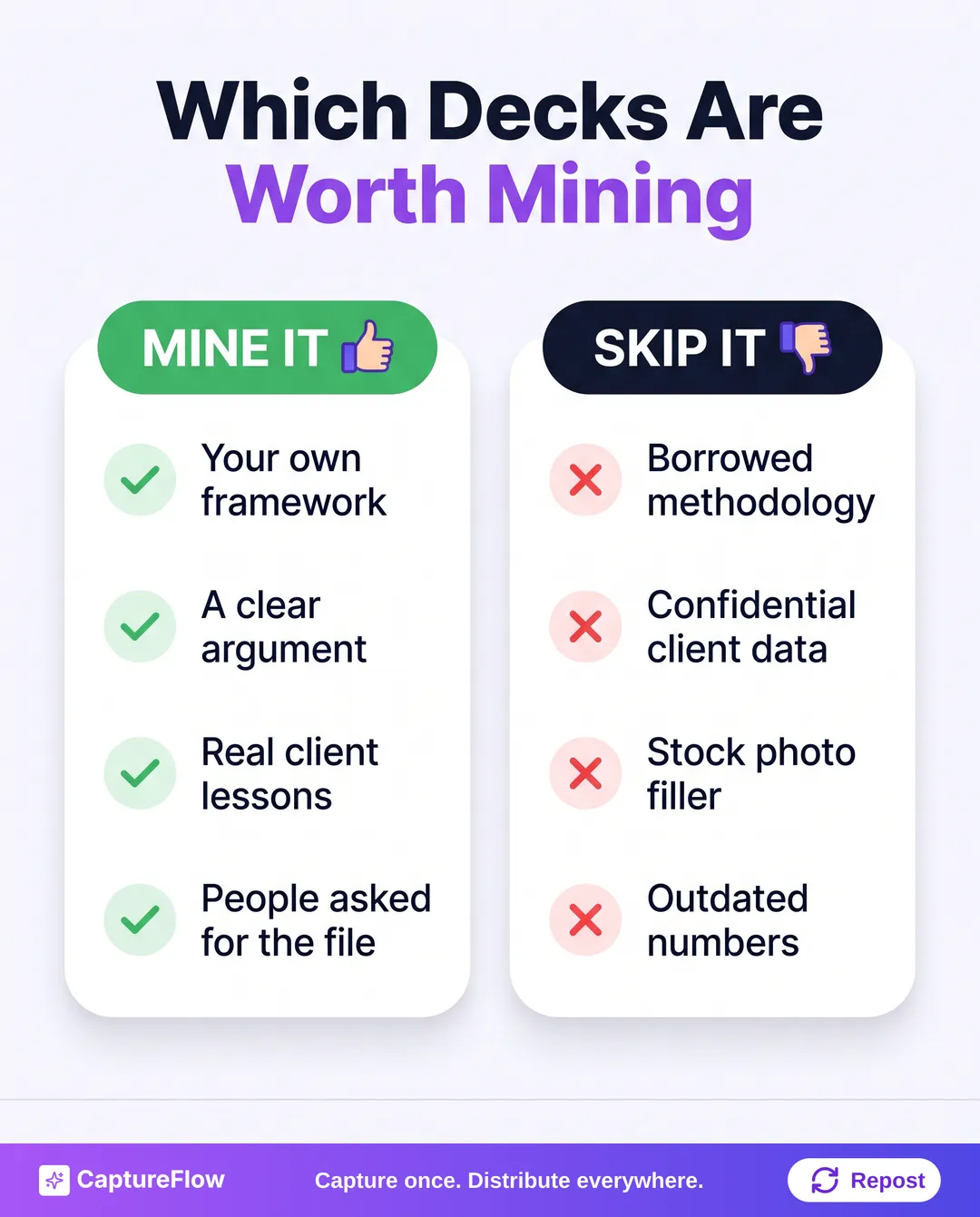 Mine the decks that carry your thinking. Leave the rest in the drive.
Strip anything confidential before a single slide goes public. Client names, revenue figures, internal roadmaps, and anything under NDA come out first. If removing them guts the slide, the slide stays private.
Step 2: Turn self-contained slides into a carousel
This is the most direct method and needs the least rewriting. A deck already has carousel DNA: a sequence of frames, one idea each, built to be consumed in order. That maps almost one-to-one onto a LinkedIn or Instagram carousel.
Open the deck and look for slides that make sense without you talking over them. Those are your carousel candidates:
- Framework slides. A 2x2, a five-step process, a comparison table. Visual and self-explanatory.
- Stat slides. One number with one line of context. A carousel handles one number per card well.
- Definition slides. "Here's what X actually means" stands on its own.
- Before/after slides. The contrast does the work, no narration needed.
You won't use most of the deck. A 30-slide talk might give you 6 to 8 keepers, and that's the point. You're taking the densest parts, not republishing the whole thing.
What about slides that only work with you presenting?
Don't drop them yet. Put the narration in the caption instead. Write the one or two sentences you'd say out loud before clicking to that slide. If it needs a full minute of explanation, it's not a carousel card; it's a text post (see Step 3).
Build the carousel
- Hook slide. A headline that earns the swipe. "3 mistakes I see in first pitch decks" beats "Pitch Deck Tips."
- Middle slides. One idea each, in the order the deck had them. The sequencing work is already done.
- CTA slide. One action: follow, reply, or click.
Then export it as a PDF. LinkedIn's document posts accept PPT, PPTX, DOC, DOCX, and PDF files up to 100 MB and 300 pages, and LinkedIn itself recommends converting to PDF for the cleanest upload, with every page fit to the same size. Animations and embedded video render as still images, so don't build a slide that depends on a build-in effect. On Instagram, a carousel now holds up to 20 photos or videos, so even a longer framework fits.
Want the full design walkthrough (sizes, type, the hook slide)? It's in how to make a LinkedIn carousel. And if you want a slide-by-slide outline before you start cutting, the free Carousel Outliner gives you one from a topic in under a minute.
Uploading the full 40-slide deck "because LinkedIn allows it" is the most common mistake here. A trimmed 6 to 10 slide PDF with a new hook slide almost always reads better in a feed than the original talk.
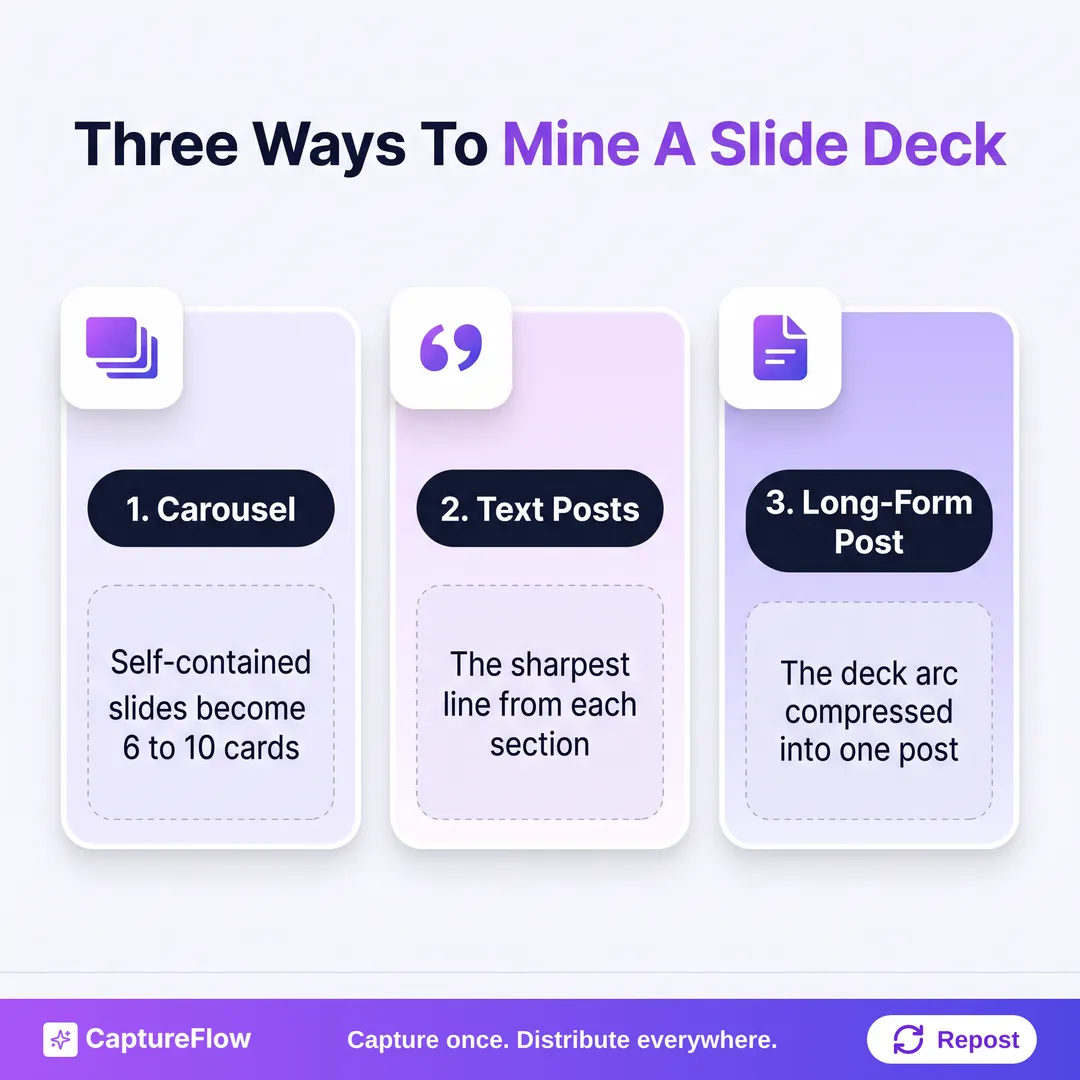 Three extraction methods. One deck feeds all three.
Step 3: Pull the sharpest line from each section for text posts
Every deck has a moment where you land a line. The sentence that made the room nod. That line is a text post, and right now it's sitting on slide 14 of a file nobody's opened since the talk.
Go section by section and find the sentence doing the most work. It's usually one of these:
- The headline of a slide you rewrote three times to make punchy
- A contrarian statement that challenged what the audience walked in believing
- A reframe ("You don't have a discipline problem. You have a missing system.")
- A specific number with a sharp interpretation attached
Check your speaker notes too. That's often where the best phrasing lives, because it's what you actually said.
Build the post around the line
- Open with the line itself. Line one, verbatim. Don't bury it.
- Explain the tension. What assumption does it break?
- Add the proof. The example or detail from the slide body (not just the headline) that makes it credible.
- Close with the implication. What should the reader do differently now?
Say your sales deck had a slide reading "Most founders think they lost the deal on the call. They lost it in the follow-up." That's your opening line. The three follow-up mistakes from the next slides are the body. Done. That kind of extraction takes about 5 minutes once you have the line, because the thinking already happened when you built the slide.
The first line matters more than anything else in the post. Nielsen Norman Group's eye-tracking work found that the first lines of text on a page receive more gazes than the lines below them, and the first words of each line get more attention than the rest. A feed is that effect on steroids. For more on writing that opener, see how to write LinkedIn hooks.
Keep the line specific. The cleaned-up, generalized version of a sharp slide is always the less interesting one.
One deck with five sections gives you five text posts. A dense 20-slide talk can give you eight.
Step 4: Compress the deck's arc into one long-form post
This is the method people skip, and it's the one that pays back the most. A well-built deck already has a narrative: a problem, a build of arguments and evidence, a recommendation. That arc is the skeleton of a long-form LinkedIn post.
Read the deck at the section level only. Ignore individual slides. Note the opening problem, the section headers, and the closing recommendation. That's the spine.
| Deck section | Long-form post equivalent |
|---|---|
| Problem or status quo | Opening hook, made personal |
| Why this matters | The tension that earns the read |
| The framework or argument | The body, one idea per paragraph |
| Evidence and examples | The specifics that make it credible |
| Recommendation | The takeaway |
| Call to action | Closing question or invitation |
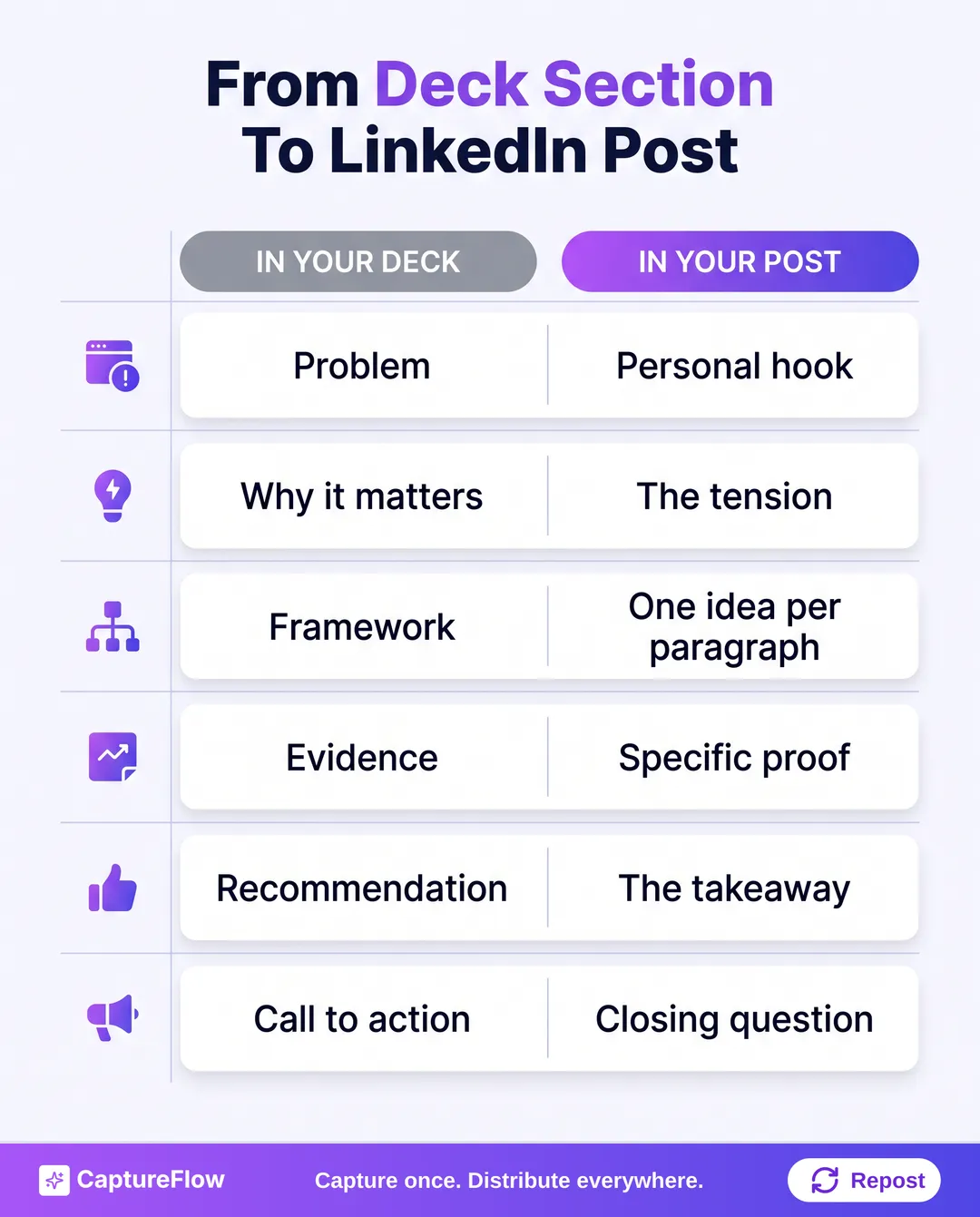 If your deck has this shape, your long-form post outline already exists.
The post isn't a summary of the deck. It's the deck's argument told in first person for someone with 60 seconds and a thumb. A few rules:
- Start with the problem, not the solution. "I watched founders make the same pricing mistake for three years" beats "Pricing is a common challenge."
- One idea per paragraph. Short paragraphs. Feed readers scan.
- Keep the framework, cut the slides. A five-step process keeps all five steps, but each gets one sentence.
- End with a real question. Something a reader can actually answer in a comment.
Watch the length. LinkedIn caps posts at 3,000 characters, which is roughly 400 to 500 words. That's plenty for a compressed deck, and the cap forces you to cut the parts that only worked live. This is content atomization in practice: the big idea is already built, you're breaking it into pieces that fit each feed.
A 20-slide deck that took four hours to build turns into a 400-word post in about 30 minutes. You're editing a draft that already exists, not writing from a blank page.
Step 5: Run it as one 90-minute mining session
Here's how the three methods fit together into one sitting you can repeat on any deck.
- Qualify the deck (5 minutes). Run it through the Step 1 test. Pass, open it. Fail, next deck.
- Read at the section level (10 minutes). One pass, no stopping. You're getting the map, not extracting yet.
- Extract the one-liners (20 minutes). One sharpest sentence per section, plus anything good in the speaker notes.
- Flag the carousel slides (20 minutes). The 6 to 8 self-contained slides, plus the caption lines for any that need help.
- Map the arc (10 minutes). Fill in the table from Step 4, one sentence per row.
- Draft and schedule (25 minutes). Write it all up and spread it across the week.
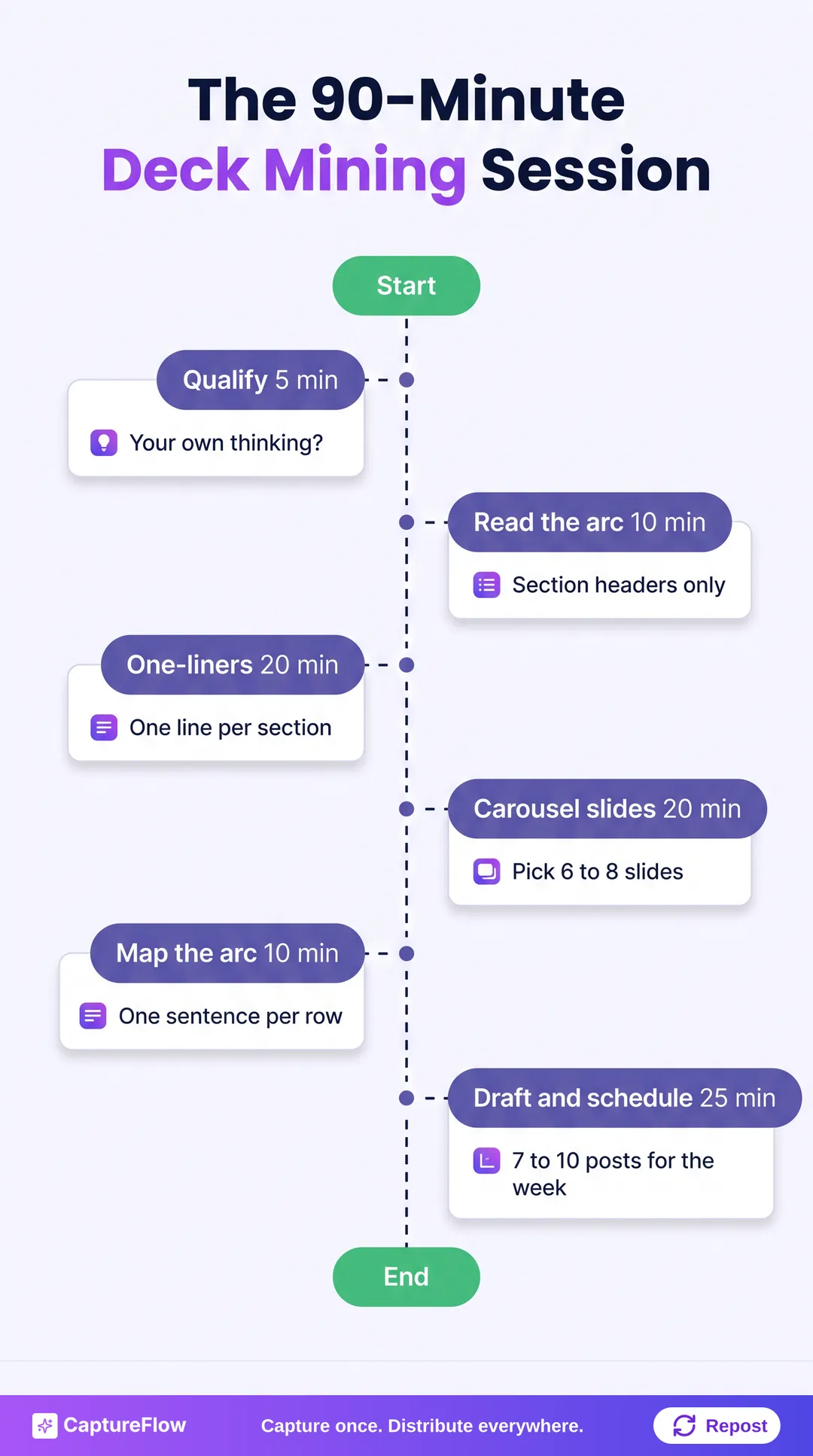 90 minutes, once. Then the week runs itself.
What comes out the other end:
| Output | Method | Posts |
|---|---|---|
| Text posts | One-liner extraction | 5 to 8 |
| Carousel | Slide conversion | 1 |
| Long-form post | Narrative arc | 1 |
| Total | 7 to 10 |
You're not alone in finding this worth doing. In HubSpot's survey of 1,500+ marketers, 35% said they actively repurpose content across channels. Which also means about two-thirds don't. Your old decks are an edge most people leave on the table.
Don't try to clear your whole archive. Start with one deck. Then make it monthly, oldest and best first. For a broader system around this, see the content repurposing strategy and the capture-first content system.
How CaptureFlow handles slide decks
CaptureFlow is an AI content agent that turns your expertise into weeks of on-brand content for every platform.
With decks, you upload the file (a PDF or slide deck works, same as a voice note, video, or link). The agent, trained on your voice and past posts, pulls the frameworks, the one-liners, and the arc, and drafts native posts for each channel: LinkedIn and X text posts, a carousel, quote images, an infographic. You review them, or leave it to your agent, and cross-platform publishing schedules them across the week. Capture takes about 5 minutes. The 90-minute session above becomes a review pass.
If you'd rather do it by hand, the method above works fine with a notes app and a PDF export. If you'd rather your drive did the work, see the plans.
Sources
- LinkedIn Help: Share a document in a post
- LinkedIn Help: Post character limit
- MacRumors: Instagram now allows up to 20 photos and videos for carousel posts
- Nielsen Norman Group: F-shaped pattern of reading on the web
- HubSpot: Marketing trends, data from 1,500+ global marketers
Frequently asked questions
Can I just upload my whole slide deck to LinkedIn?+
You can. LinkedIn document posts accept PPT, PPTX, DOC, DOCX, and PDF files up to 100 MB and 300 pages. But a 40-slide talk built for a room rarely works in a feed. Pull the 6 to 10 self-contained slides, add a hook slide and a CTA slide, and export that as a PDF.
How many posts can I get from one slide deck?+
A typical 20 to 30 slide deck with four or five sections produces 5 to 8 text posts (one per section, sometimes two), one carousel, and one long-form post. That is 7 to 10 posts, enough for one to two weeks of steady posting.
What if my slides only make sense when I present them?+
Use the caption to do the talking. Write the one or two sentences you would say out loud before advancing that slide. If a slide still needs a full minute of explanation, turn it into a text post instead of a carousel card.
Do I need to record a video to repurpose a presentation?+
No. Carousels, text posts, quote images, and infographics all come straight from the slides and your speaker notes. Video is an option if you have a talk recording, not a requirement.
Chris is the founder and CEO of CaptureFlow, which he builds so founders can turn their expertise into content without hiring a team. After 10+ years building products and growing audiences from scratch, he writes about founder-led content, AI, and distribution from inside the problem he is solving: distributing consistent, on-brand content as a team of one.
Founder & CEO of CaptureFlow · 10+ years building products and audiences
One playbook a week from founders who actually create and distribute lots of content. No spam, unsubscribe anytime.
Keep reading

Turn One Podcast Into Carousels and Short Videos
Your best 60 seconds on the mic can be a carousel and a clip by lunch. Here is the focused workflow to turn one episode into the two formats that travel furthest.

How to Repurpose One Podcast Episode into 30 Posts
You already recorded an hour of gold. Most of it dies after one listen. Here is the exact system to turn one podcast episode into 30 native posts for every platform.

How to Repurpose Podcast Clips, Voice Memos, and Automate Social Content: One System for Founders
Your podcast episode and the voice memo you recorded on the train are the same raw material. Here is one system that turns both into a week of native posts, then distributes them for you.