Turn One Podcast Into Carousels and Short Videos
A focused how-to for turning one podcast episode into LinkedIn carousels and short videos, plus the text posts to ride alongside them, in about 5 minutes.

You said something great on the mic on Tuesday. By Friday it was buried at the bottom of a feed, heard once by the people already subscribed.
The fix is not recording more. It is taking the episode you already have and reshaping the best moments into the two formats that actually travel: carousels and short video. So here is the focused answer to how to turn a podcast into LinkedIn carousels and short videos: pull your standout moments, make each framework a carousel and each tight moment a clip, then write the text posts to ride alongside them.
Turning a podcast into carousels and short videos means taking the 5 to 8 best moments from one episode and shaping each into a swipeable slide deck or a captioned vertical clip, instead of letting the audio disappear after a single listen. That is the whole move, and it is the visual, higher-reach half of the fuller podcast repurposing workflow.
I run CaptureFlow, so I have skin in this. CaptureFlow is an AI content agent that turns your expertise into weeks of on-brand content for every platform. Everything below works by hand with just a transcript and a slide tool. The agent only makes it fast.
Why carousels and short video are the two formats worth cutting first
Every episode holds a dozen formats. Two of them punch far above the rest.
Short video gets watched. 73% of consumers say they prefer short-form video when they want to learn about something, per Wyzowl's 2026 survey, and a captioned clip plays on mute in every feed. Carousels get saved. A swipeable deck is the format people bookmark and send to a colleague, which keeps it working long after it scrolls past.
Between them, they cover the two ways content spreads: reach through video and depth through carousels. That matters because the audience is enormous and mostly unreached. 80% of Americans have now listened to a podcast, an all-time high per Edison Research, yet almost none of them will scroll back to one old episode of yours.
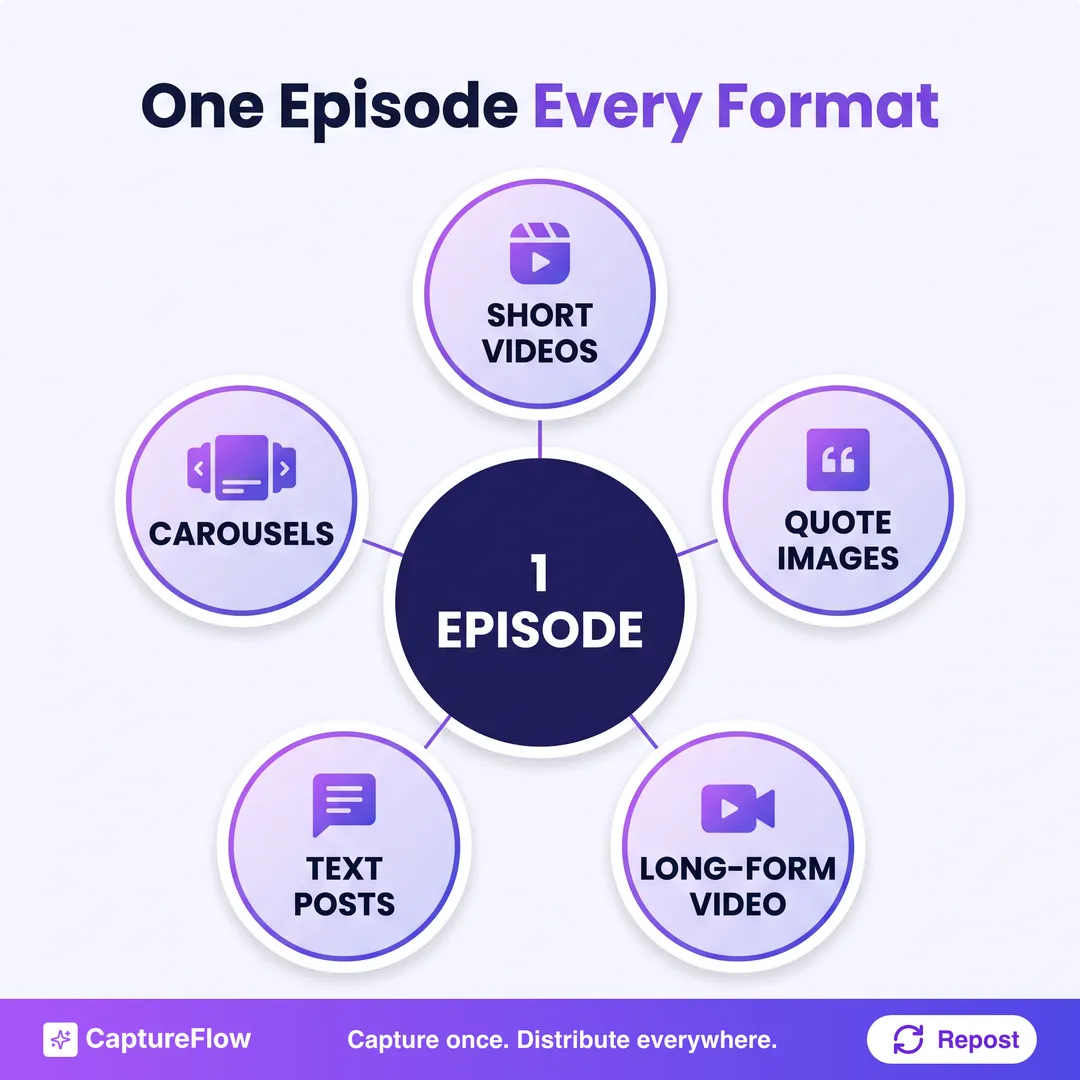 One episode is the capture. Carousels and short video are the two formats that travel furthest from it.
This is why capture once, distribute everywhere is the whole game. The episode is the raw material. The carousel and the clip are just two shapes of the same idea, sent to different feeds.
How to turn a podcast into LinkedIn carousels and short videos
Five steps, run the same way every episode. The manual version below shows the moves. The 5-minute version at the end is the same method with an agent doing the slow parts.
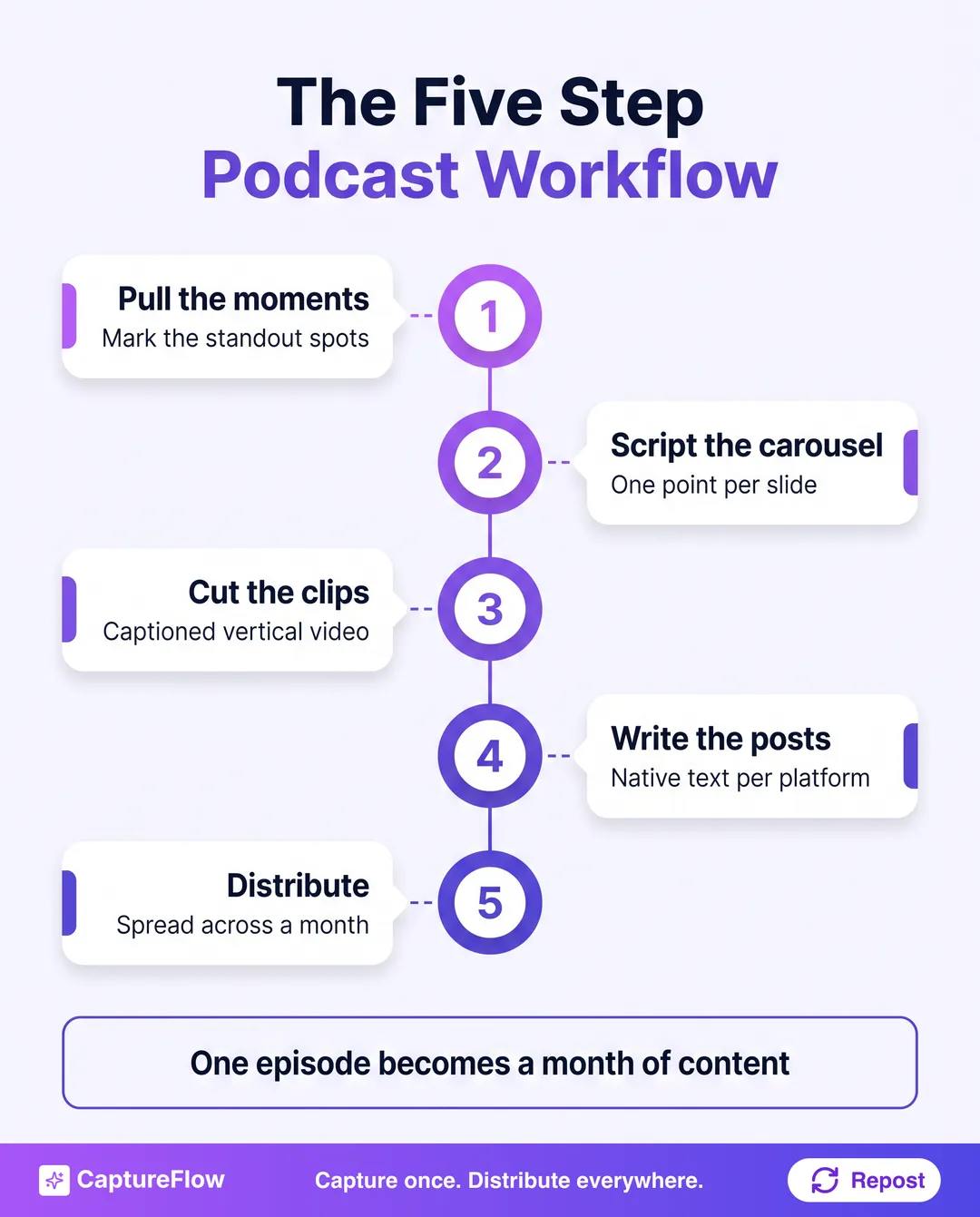 The five steps. Step one, pulling the moments, is where the value is. Everything after is fast.
Step 1: Pull the standout moments
You cannot mine audio, only text, so start from a clean timestamped transcript. Then read it once, top to bottom, and mark the 5 to 8 spots where you said something worth its own asset: the thesis, a contrarian take, a story, a named framework, a surprising stat, and your cleanest one-liners.
Tag each with its timestamp and its type. That marked list is the ore for every carousel and clip that follows. Do not force it to eight. Five genuinely strong moments beat eight where three are filler.
Step 2: Script the carousel
Carousels come from structure. Any framework, numbered list, or step-by-step your guest walked through is already a carousel waiting for slides.
Take one marked moment with a clear shape and give it one point per slide: a hook slide, one idea per swipe, a closing slide with the takeaway. Keep each slide to a bold line and one supporting sentence, because a carousel is skimmed with a thumb, not read. Our guide to making a LinkedIn carousel covers the format in detail.
The best carousel source is a moment where you counted something out loud. "There are three reasons this fails" or "here is my four-step check" maps one-to-one onto slides. Listen for those moments specifically when you mine the transcript.
Step 3: Cut the short video clips
Clips come from energy. Your tightest, most quotable 30 to 60 second moments become captioned vertical clips, sized for Reels, Shorts, and TikTok.
Pull the exact in and out points from your timestamps, trim the runway so the clip opens on the hook, and burn in captions, because silent autoplay is the default everywhere. A sharp contrarian take or a short story is the ideal clip: tension and payoff inside a minute. Aim for about eight from a full episode, and let your best two or three earn a dedicated push.
The one ruleBuild every asset from your own words. The reason a carousel and a clip land is that the substance is something you genuinely said on the mic. The moment either one starts sounding like a template, you have thrown away the only edge the episode gave you.
Step 4: Write the text posts to ride alongside
Each moment that became a carousel or a clip is also a text post. This is where a lot of the reach comes from, because a written post and a visual asset reinforce each other in the feed.
To turn a podcast into LinkedIn posts, rebuild each moment native to the platform: a strong first line, one idea, a clear takeaway, short paragraphs. Cut the spoken filler, keep your phrasing. The transcript rambles. A good post is tight. If the hook is where you stall, borrow a structure from our guide on turning one recording into ten LinkedIn posts.
Step 5: Distribute across every platform
One episode's worth of carousels, clips, and posts is a month of content, not a single day. Spread it out.
Queue the assets across four weeks, lead with your strongest clip and your sharpest carousel, and space the ones that share a moment so they reinforce rather than repeat. Then send each to the platforms it fits, since the same one video becomes content for every platform with the right native tweak per channel.
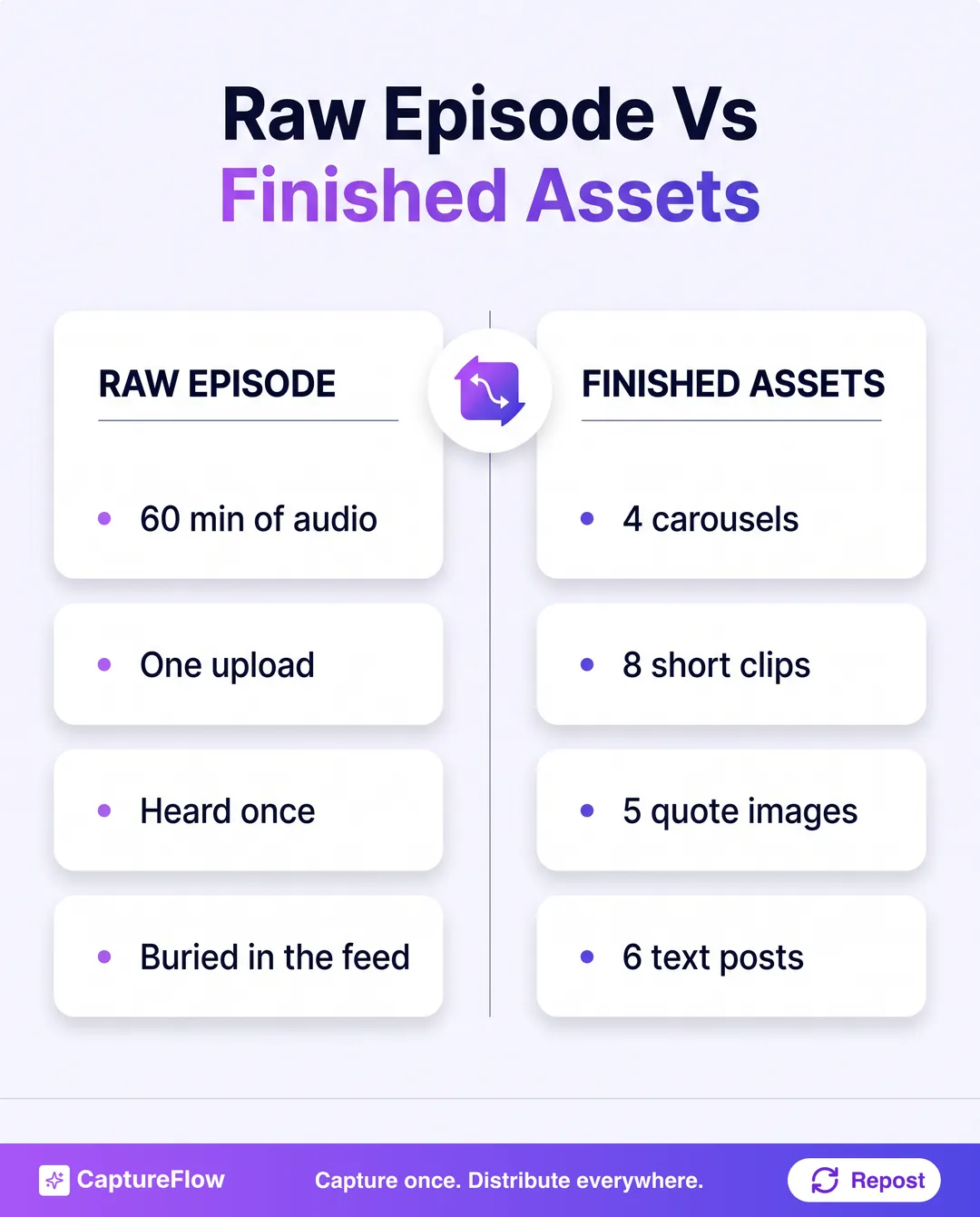 Left, one raw episode. Right, the finished set of carousels, clips, quote images, and posts from it.
The 5-minute version with AI
Run this by hand and it works. It also eats a few hours: mining the transcript, designing every carousel, trimming and captioning each clip, writing the posts.
That gap is where a content agent earns its keep. You drop the episode file or a link, and CaptureFlow transcribes it, finds your standout moments, and drafts the full set, carousels, short video clips, quote images, and text posts, each native to its platform and written in your voice because it is grounded in your past posts. You review the batch and schedule the month, in about 5 minutes instead of an afternoon.
For audio specifically, a tool like Castmagic is genuinely strong at turning a recording into raw text assets, and I would rather you use the right specialist than a worse generalist. Where CaptureFlow earns its spot is doing the whole span, transcript to finished carousels and clips to a scheduled month, in one pass.
Start with your last episode
You do not need a new recording. You need to stop wasting the ones you already published.
Pick your most recent episode, pull the moments, and turn the best of them into a carousel and a clip before lunch. If you want the 5-minute version, see how CaptureFlow fits your flow or start a free trial and turn your next episode into a month of carousels, clips, and posts.
Sources
- Wyzowl, Short-Form Video Marketing Statistics (2026)
- Edison Research, The Infinite Dial 2026
Frequently asked questions
How do you turn a podcast into LinkedIn carousels and short videos?+
Pull your 5 to 8 standout moments from the transcript, turn any framework or list into a one-point-per-slide carousel, cut your tightest 30 to 60 second moments into captioned vertical clips, then write a short text post for each idea. One moment often becomes a carousel, a clip, and a post at once.
How many carousels and clips can one episode produce?+
A focused 45 to 60 minute episode reliably yields about 4 carousels and 8 short video clips, plus text posts and quote images. The limit is how many distinct moments the episode holds, not the raw material.
Should I make the carousel or the clip first?+
Cut the clips first. Video travels furthest and gets watched on mute, so a captioned clip earns reach fast, and the same moment's transcript is the perfect starting point for the matching carousel and text post.
How long does it take to turn one episode into carousels and clips?+
By hand it is a few hours: mine the transcript, design each carousel, trim and caption each clip, and write the posts. With a content agent trained on your voice it is about 5 minutes to a full draft set you review and approve.
Chris is the founder and CEO of CaptureFlow, which he builds so founders can turn their expertise into content without hiring a team. After 10+ years building products and growing audiences from scratch, he writes about founder-led content, AI, and distribution from inside the problem he is solving: distributing consistent, on-brand content as a team of one.
Founder & CEO of CaptureFlow · 10+ years building products and audiences
One playbook a week from founders who actually create and distribute lots of content. No spam, unsubscribe anytime.
Keep reading
How to Repurpose Podcast Clips, Voice Memos, and Automate Social Content: One System for Founders
Your podcast episode and the voice memo you recorded on the train are the same raw material. Here is one system that turns both into a week of native posts, then distributes them for you.
How to Turn One Long Video Into Short-Form Clips
You already recorded the hard part. Here is how to turn one long video into eight to ten short-form clips for Reels, Shorts, and TikTok, without a video team.

The Weekly Content Workflow for a Small Marketing Team
Most small B2B teams do not have a content problem. They have a workflow problem. Here is the repeatable week that fixes it.