How to Turn One Video Into Content for Every Platform
The best workflow to turn one video into content for every platform: record once, transcribe, cut clips, reshape each idea native to each channel, then distribute.

You sat down and recorded one genuinely good video: a talk, a tutorial, a founder update, an interview. It took real effort. Then you posted it once, to one platform, and moved on to figure out what to make next.
That is the most common waste in content. One video is not one post. It is a week of them, scattered across every platform, waiting to be pulled out.
To turn one video into content for every platform, you record once, transcribe it, cut the sharpest moments into clips, and reshape each idea into a native post for each channel. This is the full workflow: how one recording becomes native content for LinkedIn, X, Instagram, TikTok, and YouTube, without you starting from a blank page five more times.
Why one video is enough for every platform
A single video is dense with reusable material. The spoken words are a script. The strong moments are clips. The frameworks are carousels. The best lines are quote graphics. You already did the hard part, which is having something worth saying on camera.
This is why repurposing has become the default. In HubSpot's 2026 State of Marketing report, 74 percent of marketers now use AI to repurpose a single asset, one video, into many formats at once. The creators who seem impossibly prolific are usually not making more; they are extracting more from each thing they make.
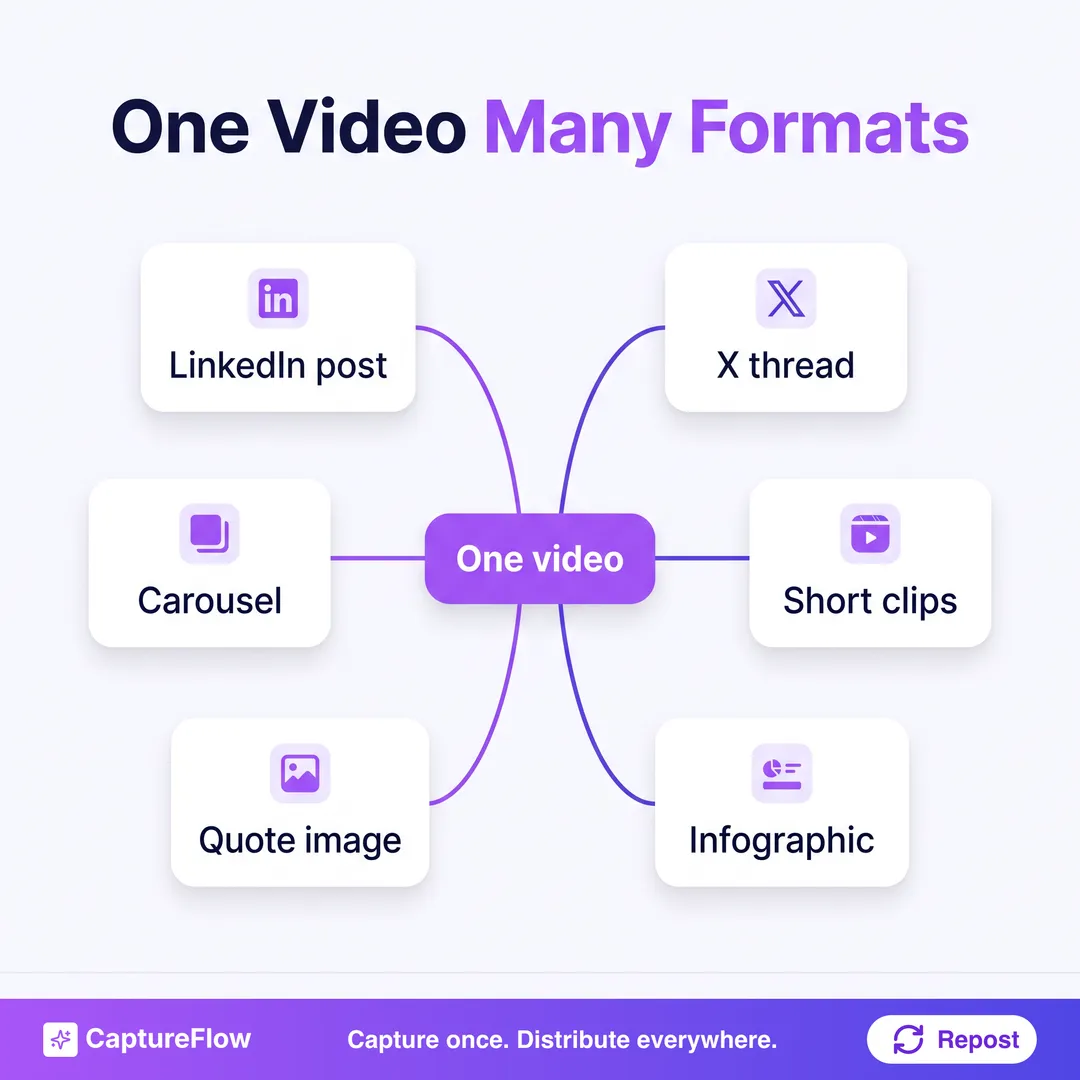 One recording, many native pieces. That is the whole idea.
The mindset shift is to stop seeing a video as a finished post and start seeing it as raw material. This is exactly content atomization: breaking one idea into many native pieces. Applied to video, it fills a content calendar from a single afternoon of recording.
How much content one video actually makes
To make it concrete, take a single focused 20-minute video where you explain a process you know well. Fully mined, that one recording becomes:
- Three to five short clips cut from the sharpest 30 to 60 second moments.
- Two or three LinkedIn posts, one per key idea, each with its own hook.
- An X thread breaking the process into steps.
- A carousel turning the process into swipeable slides.
- A quote graphic of the single best line.
- Instagram Reels and a YouTube Short from the same clips, captioned for each feed.
That is a dozen-plus pieces of native content from 20 minutes of talking you were willing to do anyway. Publish them across two weeks and one recording has filled your calendar. The multiplier is the point: you do not need more ideas, you need to fully mine the good ones you already record.
Which videos are worth repurposing
Not every video repurposes equally. The best source recordings share three traits: a clear topic, a few distinct points rather than one rambling thread, and at least one strong story or specific example.
You do not need production value. A talking-head explainer shot on your phone repurposes as well as a studio production, often better, because it reads as human. What you need is substance, because the ideas are what get reshaped, not the lighting. Long-form is a bonus: a webinar, a podcast recording, a conference talk, or a detailed customer call each contains far more than a single short clip. If you already make video of any kind, you already have the raw material.
The 5-stage one-video workflow
Here is the repeatable workflow that turns any video into a full set of native content.
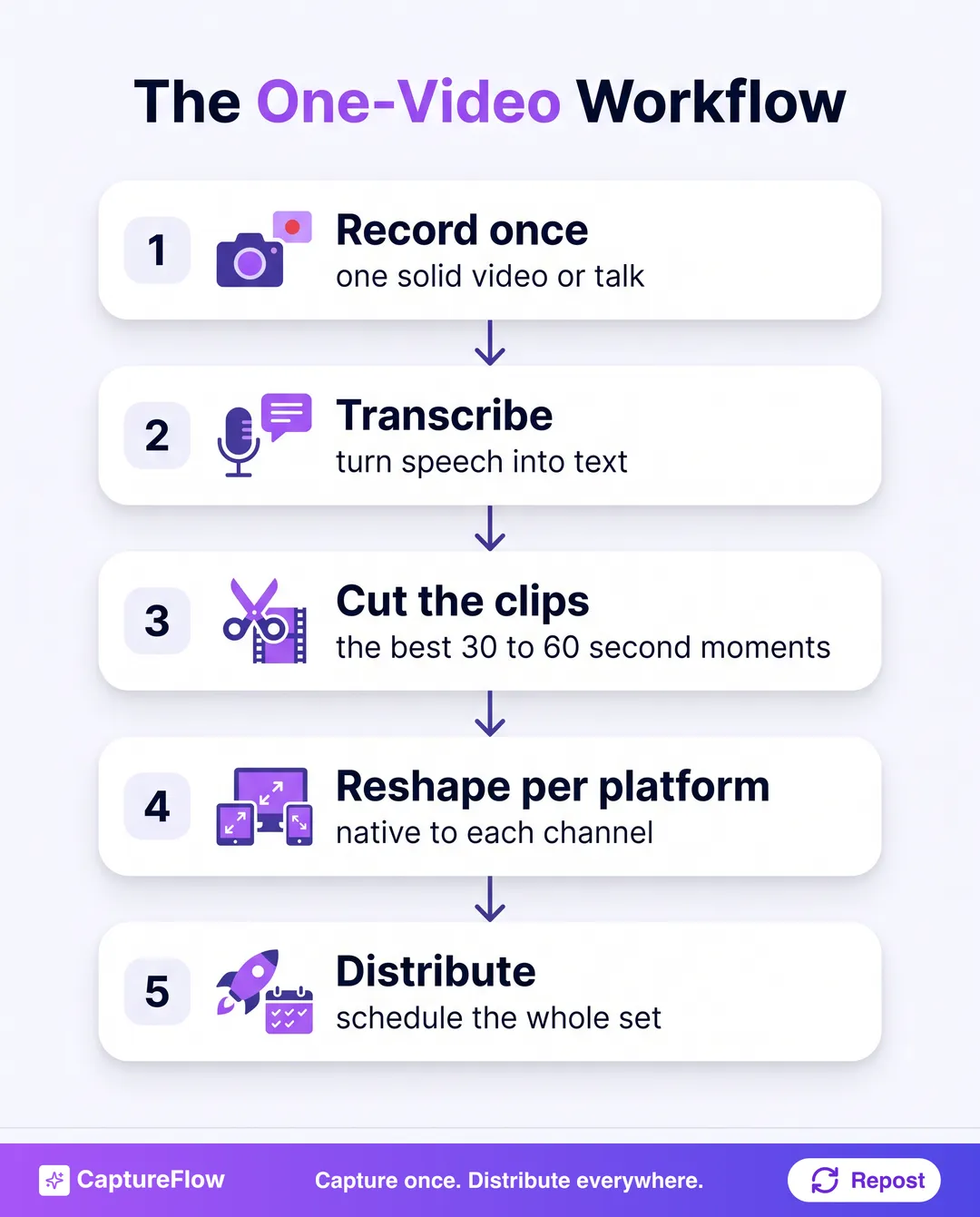 Record, transcribe, cut, reshape, distribute. Run it on every video you make.
Stage 1: Record once
Make one solid video with real substance: a lesson, a strong opinion, a walkthrough, a conversation. The richer the source, the more it yields. You are not recording a post; you are recording a well you will draw from all week.
A useful trick at this stage: while recording, loosely cover three or four distinct points rather than one. Each becomes its own thread of content downstream, so a video with four clear ideas atomizes into far more than one with a single point stretched thin. You are not scripting posts, you are just making sure the raw material has enough separate moments to pull from later.
Stage 2: Transcribe it
Turn the speech into text. The transcript is your searchable script, the raw material for every written post. Most of your LinkedIn posts, threads, and captions will come straight from lines you already said out loud.
Stage 3: Cut the clips
Find your best 30 to 60 second moments, the sharp point, the story, the surprising line, and cut them into standalone clips. Video travels furthest, and each clip also seeds a written post on the same idea. This is the step clip tools specialize in, though they stop there. For the clip craft itself, which moments to cut, vertical framing, captions, and safe zones, see how to turn one long video into short-form clips.
Stage 4: Reshape each idea native to its platform
This is the stage that separates good repurposing from robotic cross-posting. Native, not identical. The same idea becomes a LinkedIn post, an X thread, an Instagram caption, and a YouTube Short description, each written in the shape its platform rewards.
What native looks like, platform by platform:
- LinkedIn: a strong first line, short paragraphs, one idea per post, a clear takeaway. Any framework you named becomes a carousel.
- X: a punchy hook and a thread that breaks the idea into a sequence, each line able to stand on its own.
- Instagram: the clip as a captioned Reel, plus a carousel for anything visual or step-based.
- TikTok: the rawest, most human cut of the clip, with the hook in the first two seconds.
- YouTube: the strongest clips as Shorts, each with a title that promises the payoff.
The same idea runs through all of them. Only the packaging changes, and that packaging is the difference between content that fits a feed and content that fights it.
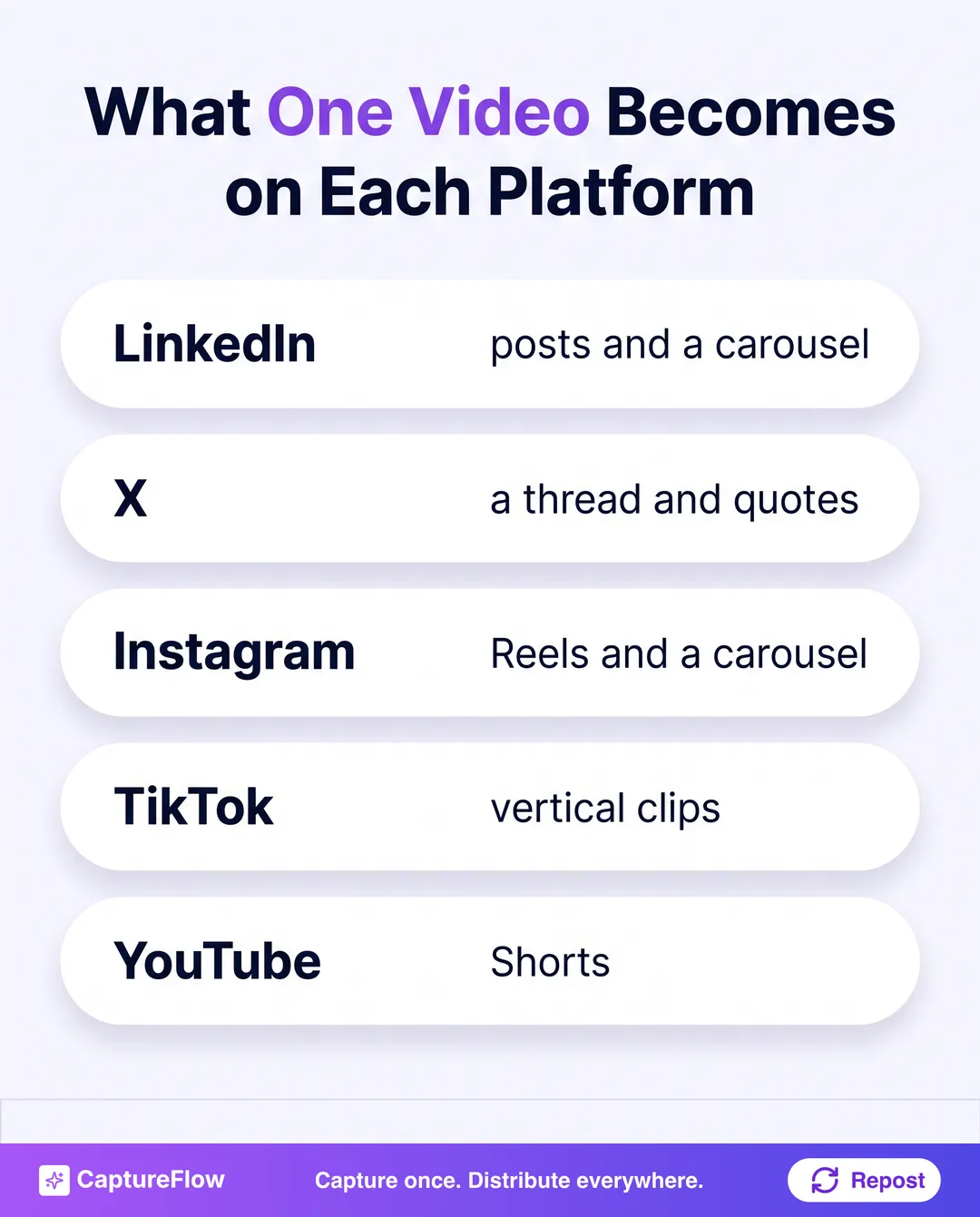 The same recording, reshaped for where each piece lives. Never the same paragraph pasted five times.
For the platform-specific deep dives: here is how to turn one recording into 10 LinkedIn posts, and how to repurpose a YouTube video specifically. This workflow is the layer above both, applied to every channel at once.
Stage 5: Distribute the whole set
Schedule the clips, posts, threads, carousels, and graphics across the coming weeks, spacing pieces that came from the same moment so they reinforce rather than repeat. One video can carry your entire posting cadence until the next recording.
Space the assets from the same moment. If your clip, your LinkedIn post, and your quote graphic all pull from the same 60 seconds, do not publish them the same day. A week apart they compound the idea; back to back they feel like reruns.
The honest math, and the shortcut
Done by hand, this is a real chore: transcribing, scrubbing for clips, cutting each one, then writing a native post for every platform. It is a half-day of work per video, which is exactly why most people record something great and then post it once. The workflow is sound; the manual version is just too slow to sustain.
That gap between "I know I should repurpose this" and "I actually have the time" is where almost all the lost content lives. The recording is the expensive part, and it is already paid for. What stops the payoff is the hours of manual reshaping between the video and the published set.
That is the gap AI closes. CaptureFlow is an AI content agent that turns your expertise into weeks of on-brand content for every platform. You drop in the video, and it transcribes it, finds the standout moments, and drafts the full set, clips, LinkedIn posts, threads, carousels, and quote graphics, each native to its platform and in your voice, ready to review. Then cross-platform publishing schedules the whole thing. About five minutes instead of a half-day.
That is also the answer to "which tool is best for repurposing video into LinkedIn and Instagram content." A clip tool gives you clips and leaves the writing to you. A content agent turns the same video into the posts, carousels, and captions each platform needs, which is the difference between repurposing one format and repurposing the whole idea. Our roundup of the best AI content repurposing tools breaks down where each option fits.
Common mistakes when repurposing video
A few habits quietly kill the payoff:
- Pasting the same caption everywhere. One block of text across LinkedIn, X, and Instagram reads as robotic and underperforms on all three. Reshape per platform, always.
- Only making clips. Clips are the easy half. Stop there and you leave the written posts, carousels, and threads, where a lot of the reach lives, on the table.
- Repurposing thin source material. A dozen weak posts from a weak video is spam at scale. The multiplier only works on a recording with real substance.
- Publishing it all at once. Dumping the whole set in a day burns the material and feels like reruns. Space it out so each piece gets its own moment.
- Letting perfect stop you. A rough clip that ships beats a polished one stuck in your drafts. Distributed beats perfect and unpublished.
The one-video ruleStop asking what to post next. Record one thing worth watching, then get everything out of it. The best week of content you will publish is usually already sitting inside a video you already made.
The move
Turning one video into content for every platform is not a growth hack, it is just refusing to waste the work you already did. Record once, transcribe, cut the clips, reshape each idea native to its channel, and distribute the set. Do that on every video and you will never again post something great exactly once, then scramble for the next idea while last week's recording sits unused.
If the reshaping is the part that has always been too slow to keep up, that is exactly what CaptureFlow is built to handle. You can see how it works, read how it fits creators specifically, or start with the full content repurposing strategy.
Sources
- HubSpot, 2026 State of Marketing report (74 percent of marketers use AI to repurpose one asset into many formats).
Frequently asked questions
What is the best workflow to turn one video into content for every platform?+
Record one solid video, transcribe it, cut your best 30 to 60 second moments into clips, then reshape each key idea into a native post for each channel: LinkedIn posts and carousels, an X thread, Instagram Reels, TikTok clips, YouTube Shorts. Finish by scheduling the whole set. The principle is one recording in, many native pieces out, rather than the same file pasted everywhere.
Which tool is best for repurposing video into LinkedIn and Instagram content?+
The best tool takes one video and produces native content for each platform in your voice, not just clips. Clip-only tools cut shorts but leave you to write the posts; a full AI content agent like CaptureFlow turns the same video into LinkedIn posts, carousels, Instagram Reels, and threads at once, ready to review, so LinkedIn and Instagram each get content shaped for them from the same recording.
How many posts can you get from one video?+
A focused 10 to 30 minute video reliably yields a week or more of content: several short clips, a few LinkedIn posts, an X thread, a carousel, and quote graphics. A longer talk or interview yields more. The limit is your extraction workflow, not the raw material, because most of the ideas are already in the recording.
Chris is the founder and CEO of CaptureFlow, which he builds so founders can turn their expertise into content without hiring a team. After 10+ years building products and growing audiences from scratch, he writes about founder-led content, AI, and distribution from inside the problem he is solving: distributing consistent, on-brand content as a team of one.
Founder & CEO of CaptureFlow · 10+ years building products and audiences
One playbook a week from founders who actually create and distribute lots of content. No spam, unsubscribe anytime.
Keep reading

The Weekly Content Workflow for a Small Marketing Team
Most small B2B teams do not have a content problem. They have a workflow problem. Here is the repeatable week that fixes it.
How to Turn One Long Video Into Short-Form Clips
You already recorded the hard part. Here is how to turn one long video into eight to ten short-form clips for Reels, Shorts, and TikTok, without a video team.
How to Scale Content Production With a Small Marketing Team
You cannot hire your way out of a content backlog this quarter. You can change the unit of work. Here is how a one to three person team produces more content without burning out.