How to Write LinkedIn Hooks That Stop the Scroll (30 Examples)
Learn how to write LinkedIn hooks that stop the scroll, with 30 linkedin hook examples across 10 proven styles and a 5-minute system to write your own.

Your best LinkedIn post is dying on line one.
Not because the idea is weak. Because the feed is a doorway, and everyone is walking past. The reader gives your first line about the same attention they give a billboard from a moving car: a glance, a verdict, and they are gone. Nine times out of ten the post underneath was good. It just never got read, because the linkedin hook at the top asked for patience the feed does not have.
This guide fixes that. First, what a hook actually is and why the first line does all the work. Then 10 hook styles with 30 real linkedin hook examples you can steal today. Then a 5-minute system for writing your own so you never stare at a blank line one again. The hook is one layer of a bigger system, so if you want the full picture, start with our LinkedIn content strategy guide and come back here for the craft.
I run CaptureFlow, so hooks are my whole job. CaptureFlow is an AI content agent that turns your expertise into weeks of on-brand content for every platform. But you do not need a tool to write a good hook. You need to understand the one job it has.
What a LinkedIn hook actually is
A LinkedIn hook is the first line of your post, the one line the feed shows before "see more", written to make scrolling past feel like a mistake.
That is the whole definition. It is not a title. It is not a summary. It is a tripwire.
On mobile, LinkedIn truncates most posts after the first line or two and hides the rest behind a "see more" link. So your hook is not competing with the body of your post. It is competing with everyone else's line one, in a feed that never stops moving. Win that line and the reader expands the post. Lose it and the best writing you have ever done sits unread three taps down.
What makes a hook stop the scroll
People do not read the feed. They scan it, then judge fast.
Princeton research found that we form a first impression of a face in about 100 milliseconds, and giving people more time barely changed the verdict. A line of text is not a face, but the reflex is the same: the reader decides almost instantly whether you are worth another second. And decades of eye-tracking from the Nielsen Norman Group show people read the first two words of a line far more than the rest and, across a page, take in only about a quarter of the words. Your hook has to survive a scan, not a read.
The hooks that survive share an anatomy.
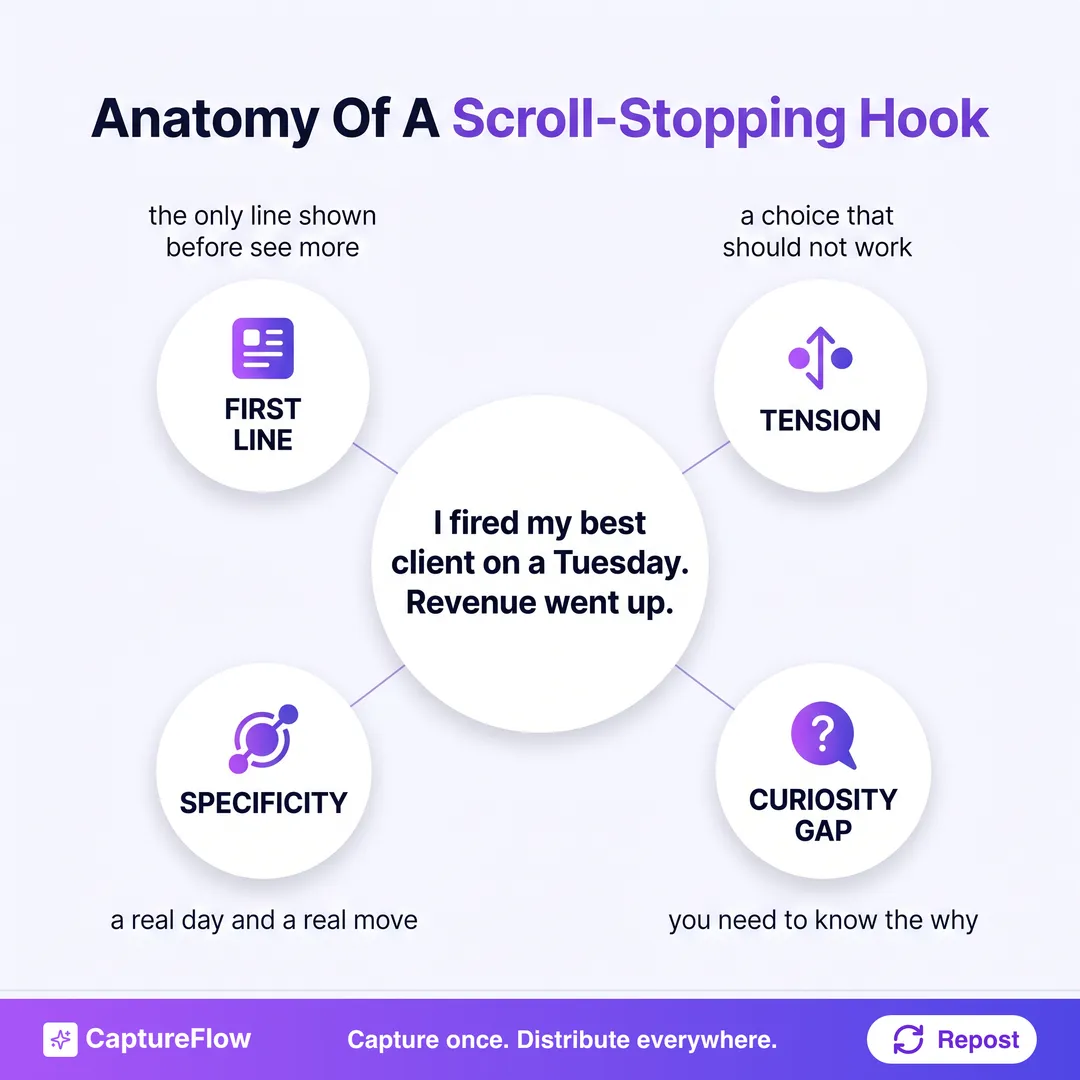 One strong hook, four working parts. Every good hook does at least two of these at once.
- First line does the work. It is the only line guaranteed to be seen. Do not warm up, do not set context, do not say "excited to share". Open on the sharpest thing you have.
- Tension. A hook needs a reason to keep reading. A choice that should not work, a result that contradicts the setup, a stake. No tension, no pull.
- Specificity. "I made a big change" is invisible. "I fired my best client on a Tuesday" stops the eye. Concrete nouns, real numbers, and real moments beat abstractions.
- A curiosity gap. Say enough to raise the question, not enough to answer it. The reader clicks "see more" to close the gap you opened.
The fastest fix for a flat post is not rewriting the whole thing. It is finding the most surprising sentence already buried in your draft and moving it to line one. Most people bury their best hook in paragraph three.
10 LinkedIn hook styles with 30 examples
Here are the 10 hook styles worth knowing, each with three linkedin hook examples. These are the same 10 styles our free hook generator writes from, so once you know them by name you can request the angle you want. Steal the structure, swap in your own specifics, and never post a warm-up line again.
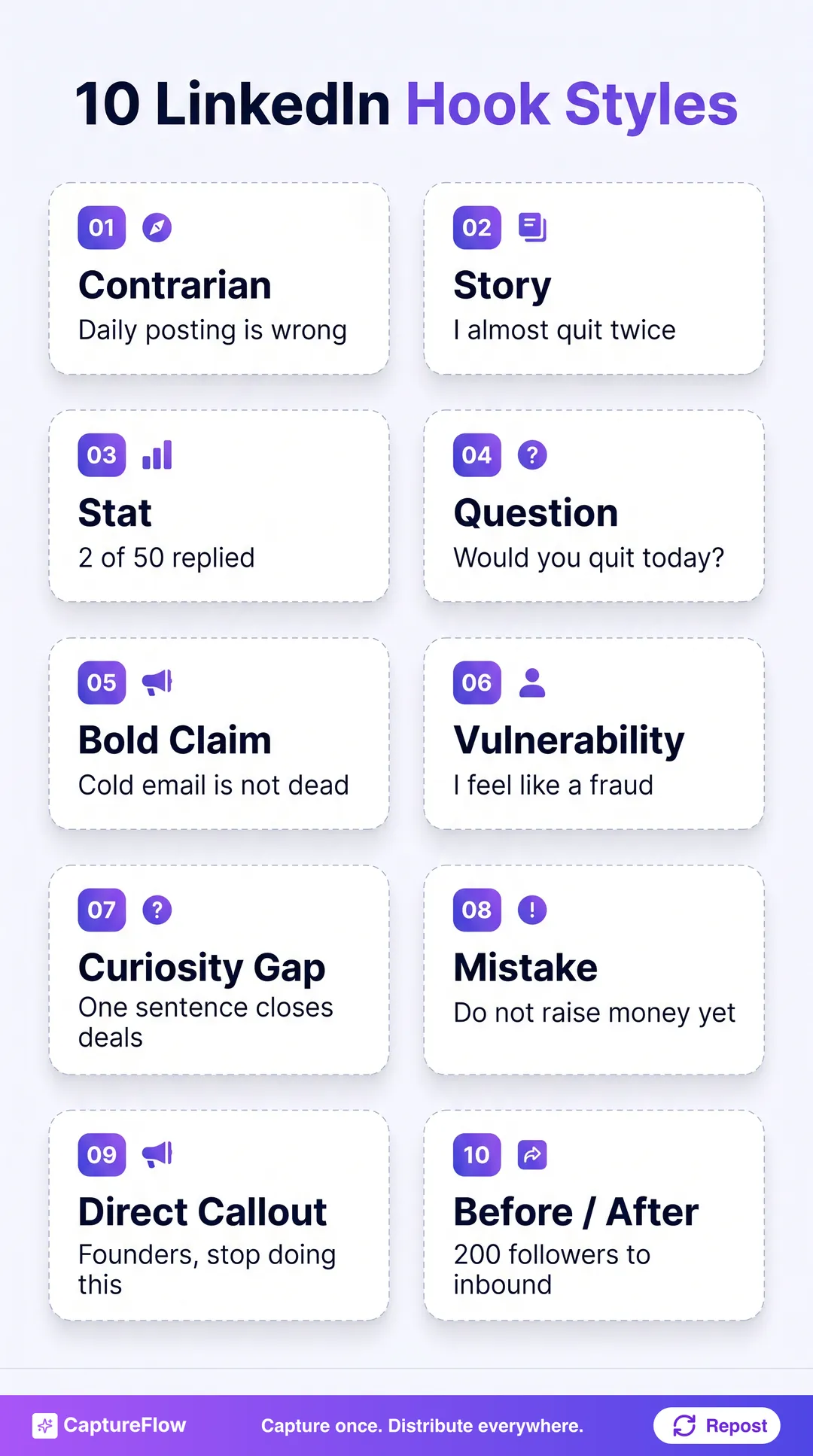 Ten reliable hook styles. Pick the one that fits your point, not the one that feels safe.
1. Contrarian
Disagree with something your audience takes for granted. Tension is built in.
- "Posting every day is the worst advice on LinkedIn. Here is what actually moved my numbers."
- "Your niche is not too small. Your content is too safe."
- "Consistency is overrated. I posted 3 times last month and closed more than the year I posted daily."
2. Story
Open in the middle of a scene. Narrative pulls people to the end of a post better than any other format.
- "Three years ago I got laid off by a voicemail. It turned into the best thing that happened to my career."
- "A customer emailed at 2am to cancel. What I did in the next 10 minutes saved the account."
- "I almost deleted the post that brought me 400 new followers. Here is why I hesitated."
3. Stat
Lead with a real number from your own life or work. Specific figures stop a scanning eye cold.
- "I sent 50 cold emails last week. Exactly 2 replied. Both became customers."
- "Our onboarding took 14 clicks. We cut it to 3. Signups doubled in a month."
- "I read 62 books last year. Only 4 changed how I actually work."
Use your own numbers, not borrowed ones. A stat hook only works because it is true and specific to you. "Studies show 78% of..." reads like a slide. "We lost 3 customers in one week" reads like a person.
4. Question
Ask the exact thing your reader is quietly wondering. A good question demands an internal answer, which is a form of stopping.
- "What is the one piece of advice you would give your first-year-founder self?"
- "Would you take a 30% pay cut to work four days a week? I did. Here is what happened."
- "Why do so many smart people write such forgettable LinkedIn posts?"
5. Bold Claim
State something big and definite. Confidence is magnetic in a feed full of hedging.
- "Cold email is not dead. You are just bad at it."
- "Most of your meetings could be a Loom, and everyone in them knows it."
- "You can build an audience of 10,000 without ever going viral once."
6. Personal Vulnerability
Admit the thing most people hide. Honesty is rare enough on LinkedIn that it stops people by itself.
- "I have run this company for six years and I still feel like a fraud most Mondays."
- "I cried in a bathroom before the pitch that raised our seed round."
- "I hid our revenue numbers for two years because I was embarrassed by them."
7. Curiosity Gap
Name a result and withhold the mechanism. The reader has to open the post to get the how.
- "There is one line I add to every proposal that closes 20% more deals. It is not about price."
- "The best hire I ever made failed the interview."
- "I do the opposite of what every growth guide says, and it keeps working."
8. Mistake / Warning
Warn the reader off a specific error. Loss aversion makes a warning hard to scroll past.
- "Do not raise money before you read this."
- "I lost 40k on a rebrand nobody asked for. Learn from my mistake, not your own."
- "If your onboarding email starts with the word 'we', you are already losing customers."
9. Direct Callout
Name your exact reader in line one. When people see themselves, they stop.
- "Founders: your 'quick call to pick your brain' is costing you six hours a week."
- "If you are a solo consultant still trading hours for dollars, this one is for you."
- "To every marketer who was told to 'just post more': stop."
10. Before / After
Show the gap between where you were and where you are. Transformation is the most shareable shape there is.
- "18 months ago I had 200 followers and zero inbound. Now my calendar books itself. Here is what changed."
- "From three-hour content days to 15 minutes a week. Same output, different system."
- "I went from dreading LinkedIn to posting without thinking. One habit did it."
The one ruleThe best hook is almost never invented. It is discovered, already sitting in the middle of your draft. Your job is to find the truest, most specific sentence you wrote and drag it to the top.
How to write your own in 5 minutes
You do not need to be a copywriter. You need a repeatable move.
1. Write the post first, hook last. Get the whole idea down without touching line one, following the same five-part anatomy behind any LinkedIn post that gets engagement. Trying to write the hook from a blank page is why most people quit before they start.
2. Hunt for the buried lede. Read your draft and mark the single most surprising, specific, or honest sentence in it. That sentence is usually your real hook, hiding in paragraph two or three.
3. Move it to the top and cut the warm-up. Delete every setup line above it. "I have been thinking a lot about hiring lately" is a warm-up. "I hired the wrong VP twice before I saw the pattern" is a hook.
4. Check it against the anatomy. Does line one carry tension, specificity, and an open loop? If it explains too much, it is a summary, not a hook. Trim until the reader has to click.
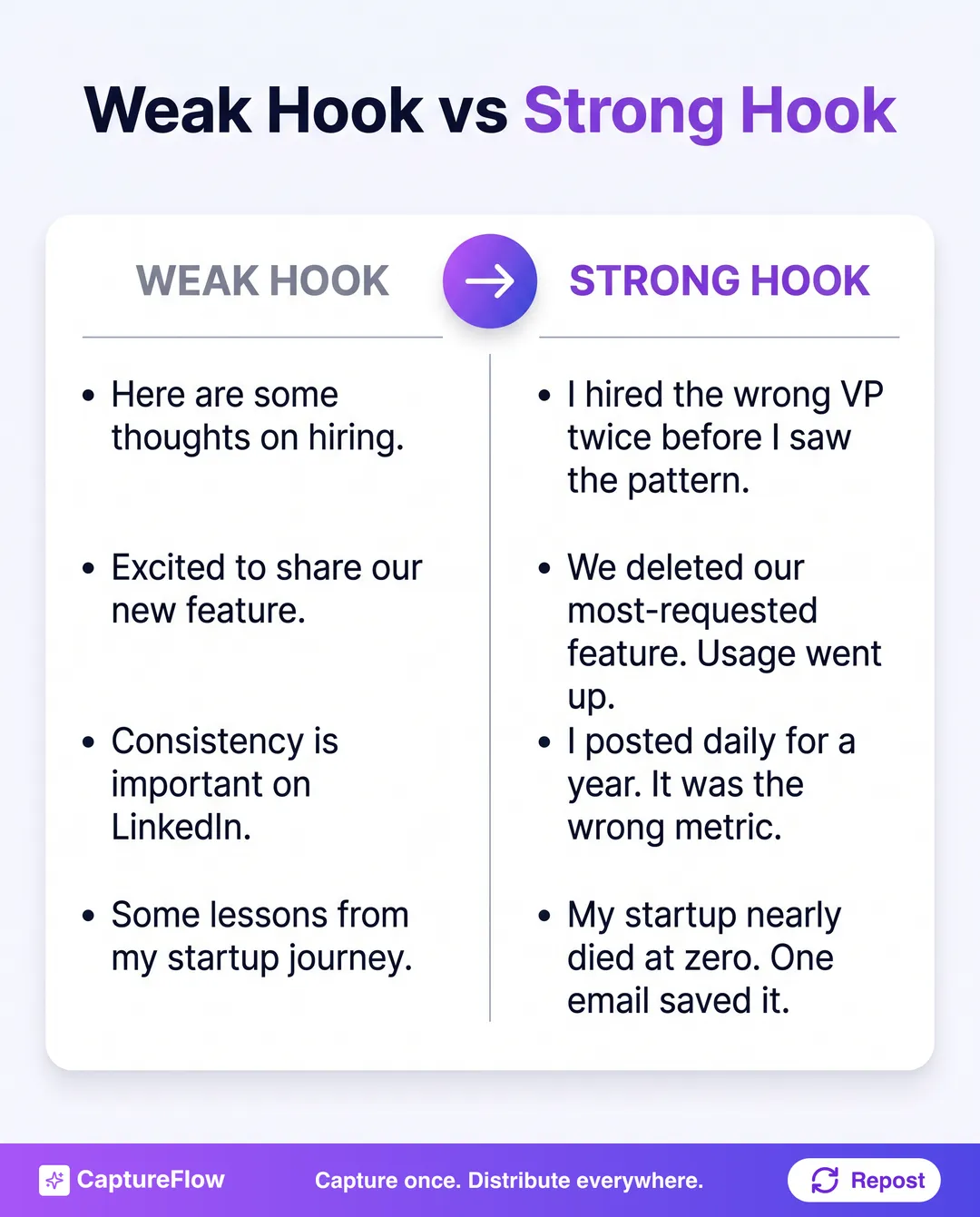 Same idea, two openings. The weak version explains. The strong version makes you need the rest.
5. Write three, not one. Draft three different hooks for the same post using three different styles above, then pick the one with the most tension. If you would rather not draft them by hand, our hook generator will write 10 hooks from your topic in seconds, one per style, so you react to options instead of a blank line. Paste your best draft into the LinkedIn post analyzer to pressure-test the whole thing before you post.
This is the same instinct behind turning one video into 10 LinkedIn posts: the raw material is already yours, you are just surfacing the sharpest version of it. Pair a strong hook with the right posting time and an understanding of how the LinkedIn algorithm works, and a good line one starts compounding. For the tools that draft hooks and posts at scale, see our roundup of the best AI LinkedIn content tools. And a great hook is just one of the LinkedIn personal branding tips that build a following over time.
Stop staring at line one
A hook is not a talent you either have or you do not. It is a move: write the post, find the buried lede, cut the warm-up, open a gap.
Do that on your next post and watch what happens to the "see more" taps. Or skip the blank page entirely: generate 10 hooks from your topic in seconds with our free tool, then start a free trial and let your content agent draft the whole post underneath the winner.
Sources
- Nielsen Norman Group, "First 2 Words: A Signal for the Scanning Eye" and "F-Shaped Pattern of Reading on the Web"
- Princeton University, "Snap judgments decide a face's character" (Willis and Todorov, 2006)
Frequently asked questions
What is a LinkedIn hook?+
A LinkedIn hook is the first line of a post, the one sentence the feed shows before the 'see more' cut. Its only job is to make someone stop scrolling and expand the post, so it should carry tension, a specific detail, or an open question rather than a warm-up.
How long should a LinkedIn hook be?+
One line, ideally under 12 words. LinkedIn truncates most posts after the first line or two on mobile, so the hook has to land before the reader ever sees the rest. Short, concrete, and front-loaded beats long and vague every time.
What makes a LinkedIn hook stop the scroll?+
Tension and specificity. People form an impression in a fraction of a second and scan far more than they read, so a hook that names a real number, a real moment, or a claim that seems wrong at first gives the eye a reason to stop and the mind a reason to keep reading.
How do I write a hook if I am not a copywriter?+
Write the whole post first, then hunt for the single most surprising or specific sentence already in it and move that to the top. The best hook is usually buried in the middle of your draft. A hook generator can also give you 10 angles to react to instead of a blank line one.
Chris is the founder and CEO of CaptureFlow, which he builds so founders can turn their expertise into content without hiring a team. After 10+ years building products and growing audiences from scratch, he writes about founder-led content, AI, and distribution from inside the problem he is solving: distributing consistent, on-brand content as a team of one.
Founder & CEO of CaptureFlow · 10+ years building products and audiences
One playbook a week from founders who actually create and distribute lots of content. No spam, unsubscribe anytime.
Keep reading
How to Write a LinkedIn Post That Gets Engagement (Templates)
Most LinkedIn posts get ignored because they read like a memo, not a conversation. Here is how to write a LinkedIn post that gets engagement, plus 5 templates you can steal.

What Drives LinkedIn Engagement: 2,500 Posts Analyzed
We pulled the public LinkedIn history of 25 founders, 2,500 posts in total, to build our playbook teardowns. The engagement pattern hiding in that data surprised us.
LinkedIn Content Ideas: 50 Posts to Steal When You're Not an Influencer
You are not out of things to say, you are out of shapes to say them in. Here are 50 specific LinkedIn content ideas, organized into 6 buckets, that you can post starting today.