How to Repurpose a Webinar Into Content for Every Platform
How to repurpose a webinar into three weeks of native posts: mine the transcript, chat, and polls, cut clips, build a carousel, and post in order.

You spent three weeks on the deck, the invite sequence, and the run of show. Sixty people turned up, the Q&A ran long, and somebody in the chat called it the most useful hour of their week. Then you emailed the replay link and moved on. If you want to repurpose a webinar properly, the answer is to stop treating the live session as the finish line. The recording, the transcript, the chat, and the poll results are raw material for three weeks of posts on every platform your buyers use.
This playbook shows the system: what to pull out, what to build from it, how to adapt each piece, and the order to post it in.
Here's the definition I work from.
A webinar is a recorded, audience-tested content library: every question in the chat is a post your market asked for, and every poll result is data nobody else has.
Why repurpose a webinar at all?
Because most of your audience never saw it live. Even the people who registered split their attention: in ON24's 2025 Digital Engagement Benchmarks, 45% of attendees chose to watch webinars on demand rather than live. And that's attendees. The far bigger group is everyone who never registered: your LinkedIn followers, the buyers scrolling X, the founder who'd have loved your framework but doesn't sit through hour-long sessions.
They do read this kind of material, though. In the 2025 Edelman and LinkedIn B2B Thought Leadership Impact Report, 64% of target buyers and 63% of "hidden" buyers (the people who influence deals from the sidelines) said they spend more than an hour a week on thought leadership content. Your webinar is that content. It just sits behind a registration form.
Then there's memory. The people who did attend forget fast. When Murre and Dros replicated Ebbinghaus's forgetting curve in 2015, the steepest drop came in the first day. So posting your webinar's best ideas for three weeks isn't repetition. For almost everyone, it's the first time.
The webinar lasted an hour. The ideas in it are good for three weeks.
The system at a glance
- Collect four sources, not one. Recording, transcript, chat and Q&A log, poll results.
- Do one extraction pass. Mark sharp takes, quotable lines, frameworks, numbers, and questions.
- Map moments to formats. Each moment becomes the asset it fits best.
- Build the carousel. Turn the strongest framework into one swipeable argument.
- Adapt every piece natively. Same idea, different shape per platform.
- Post in order of effort. Quick wins first, heavier assets later, over three weeks.
Step 1: Collect four sources, not just the recording
Most hosts download the MP4 and stop there. That's a quarter of what you have.
- The recording. Ask for (or export) the full-resolution version, plus the speaker-view track if your platform records it separately. Gallery view with six faces makes terrible clips.
- The transcript. Most webinar and meeting platforms can export one. If yours can't, run the recording through any transcription tool. You'll read the transcript, not rewatch the video; skimming text is several times faster than watching.
- The chat and Q&A log. This is the part almost everyone throws away, and it's the best part. Every typed question is a buyer telling you, in their own words, what they're stuck on.
- Poll results. If you ran polls, export the numbers. A poll of 120 practitioners isn't a research study, but it's original, it's yours, and it's exactly the kind of specific number that makes a post worth stopping for.
Step 2: Do one extraction pass on the transcript
Read the transcript once, with a highlighter and a specific brief. You're hunting for moments that stand alone, ones that make sense to someone who never saw the webinar.
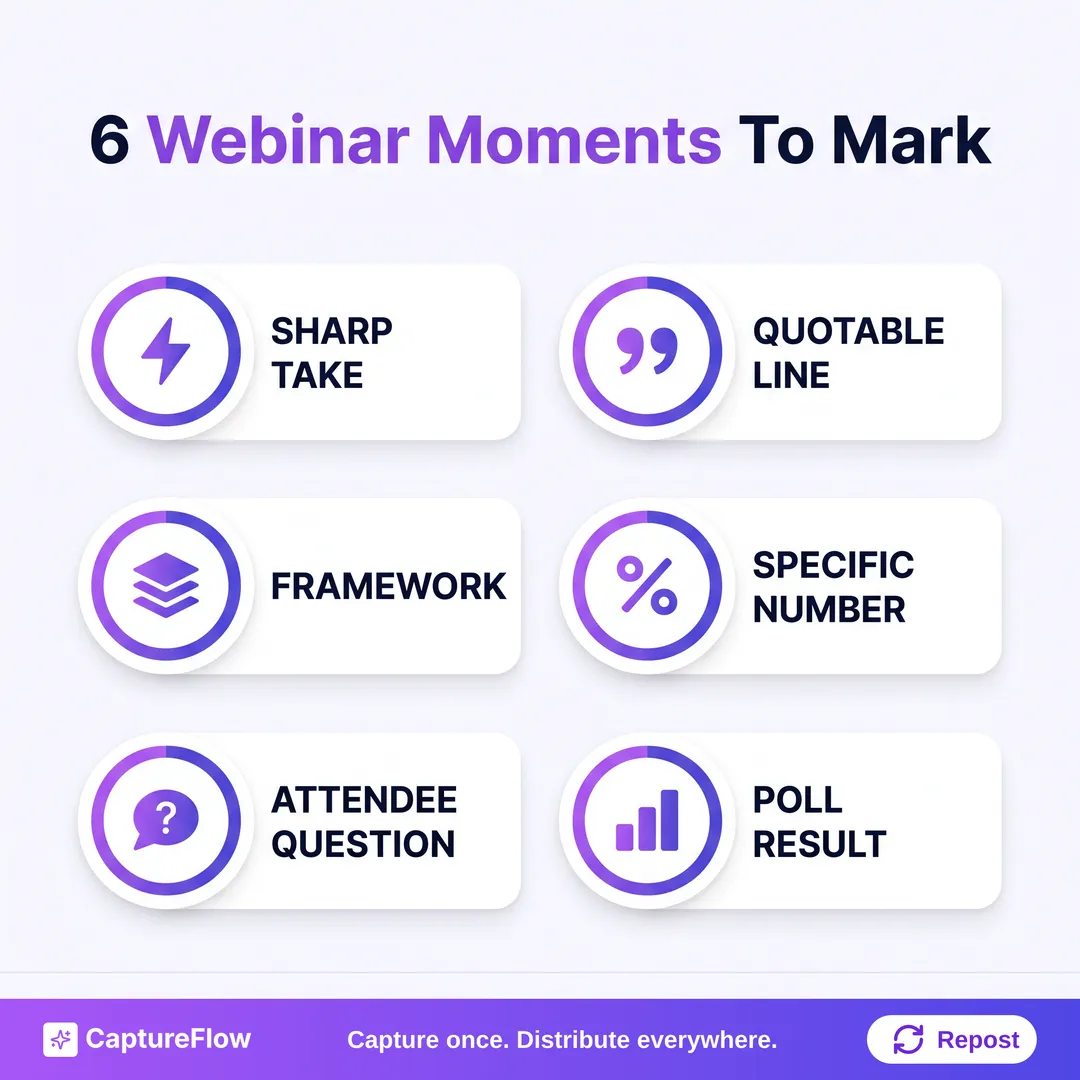 Mark these six types on one pass through the transcript and chat log.
- Sharp takes. A claim that cuts against what your audience assumes. "Most of your webinar's value arrives after it ends" is one.
- Quotable lines. A sentence that's complete without context. Cover the speaker's name; if the line still lands, keep it.
- Frameworks. Any time someone said "there are three things" or "here's how we break it down." These become carousels.
- Specific numbers. Percentages, timelines, before-and-after results. They become your most-shared slides.
- Attendee questions. Pull them from the chat and Q&A log, along with the answer given live. Each one is a ready-made post.
- Poll results. The number, the question, and the one-line takeaway.
A good 45 to 60 minute webinar usually yields 15 to 25 of these. If you find fewer than eight, the session was probably too broad or too demo-heavy, which is useful feedback for the next one, not a reason to give up on this one.
You can do this pass by hand in about 30 minutes. Or paste the transcript into our free key moments finder or quote extractor to get a first list, then cut it down yourself.
Step 3: Map each moment to the format it fits
Every moment has a natural home. Don't force a framework into a 20-second clip, and don't turn a great one-liner into a ten-slide carousel.
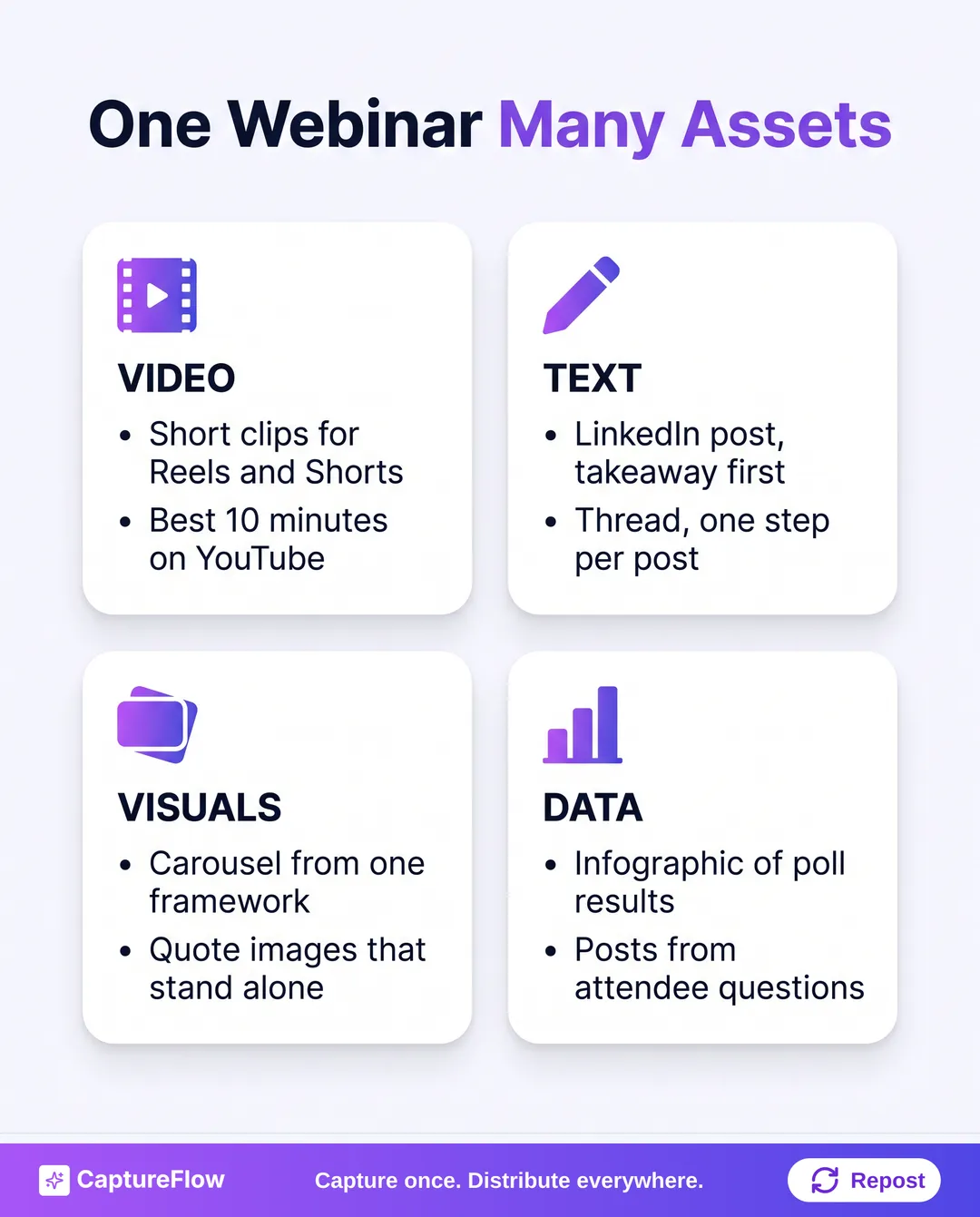 One recording, four families of assets.
| Moment | Best format | Where it lands |
|---|---|---|
| Sharp take, said with energy | Short vertical clip (30 to 90 sec) | TikTok, Instagram Reels, YouTube Shorts, LinkedIn |
| Quotable line | Quote image | Instagram, LinkedIn, Threads |
| Framework or process | Carousel | LinkedIn, Instagram |
| Framework or process | Thread | X, Threads |
| Specific number or poll result | Infographic or text post | LinkedIn, X, Pinterest |
| Attendee question + answer | Text post | LinkedIn, Threads, Facebook |
| The strongest 8 to 12 minutes | Long-form cut | YouTube |
Notice the replay link isn't on the list. It still has a job (send it to registrants, and drop it in the comments of your posts), but it isn't the content. Your own email list gets the replay; the feed gets the ideas.
If you've already got a process for turning one long video into short clips, the video side of this table will feel familiar. The difference with a webinar is the chat and the polls. Those are the bits a podcast or a YouTube video simply doesn't have.
Step 4: Build the carousel from your strongest framework
The carousel is the asset that does the most work on LinkedIn, so it gets its own step. Pick one framework from the webinar, not the whole session. "How we cut onboarding from 14 days to 5" is a carousel. "The future of customer success" isn't, unless you pull one concrete argument out of it.
Three structures cover almost every webinar:
- The framework. Hook slide naming the problem, one step per slide, a result slide, a close.
- Myth vs reality. Hook slide naming the wrong belief, one myth and its correction per slide, a synthesis slide.
- Before and after. Lead with the result, show the before, walk through the changes one per slide, end on the number.
Write five hook slides before you pick one. The first slide does more work than the other nine combined, and your first draft is rarely the best. Keep body slides to a 5 to 8 word headline and one to three supporting lines. Stay between 8 and 12 slides.
LinkedIn carousels are uploaded as documents, and LinkedIn's own limits are generous: PDF, PPT, or DOC files up to 100 MB and 300 pages. You won't get near either. Export as PDF in portrait (1080 by 1350 pixels reads better on a phone than square). For the full design checklist, see our guide on how to make a LinkedIn carousel, or use the carousel outliner to draft the slide sequence.
And don't stop at one. A 60-minute webinar usually holds two or three carousels: the main framework, the Q&A as a "questions we got asked" carousel, and the poll results as a data carousel.
Step 5: Adapt every piece to its platform
This is where most webinar repurposing quietly fails. Someone pulls a quote, pastes it into LinkedIn, X, Threads, and Facebook, and calls it done. That's broadcasting. Each feed rewards a different shape, and the same text in five places underperforms in all of them.
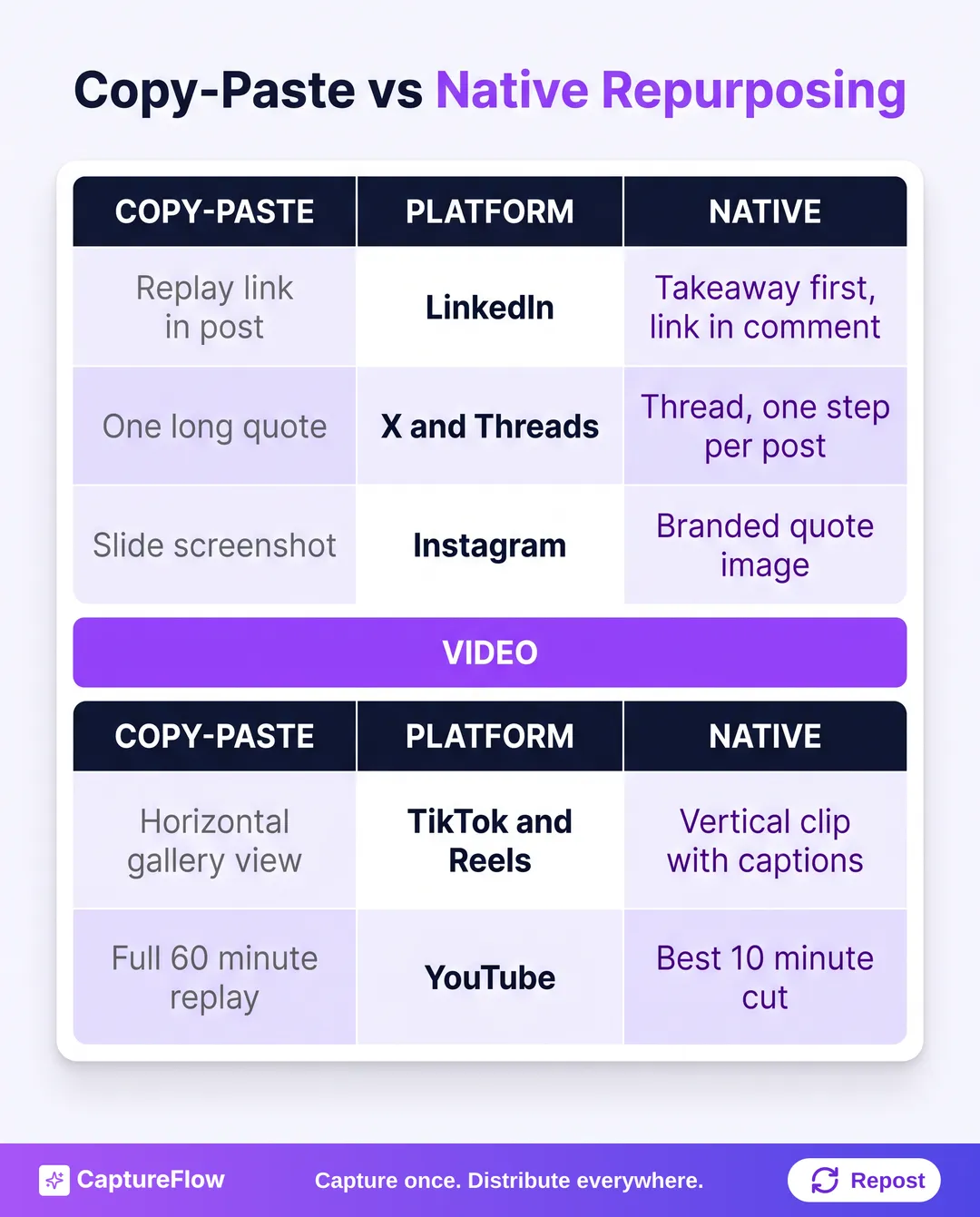 Same moment, five shapes.
What native looks like, platform by platform:
- LinkedIn. A text post that opens with the takeaway, not "We hosted a webinar last week." Put the replay link in a comment. Carousels go up as native documents.
- X and Threads. A thread: the sharp take as post one, one step per post, the replay link at the end. Specific beats general. A line like "we polled 140 RevOps leads" beats "many teams find."
- Instagram. Quote images and carousels in your brand colors, plus Reels cut from the recording.
- TikTok and YouTube Shorts. Vertical, captioned, and starting mid-thought. If the first three seconds are "So, today we're going to talk about," cut them.
- YouTube. A long-form cut of the best 8 to 12 minutes, with a title that names the outcome, not the event.
Captions matter on every video. Plenty of people scroll with the sound off, and a clip that relies on audio loses them in the first second. Add them, check the spelling of names and numbers, and move on.
Step 6: Post in order of effort over three weeks
Order matters more than people think. Start with the hardest asset and you'll run out of steam before the quick wins go out. Start with the quick wins and you've got momentum, and content in the feed within 48 hours while the topic is still warm.
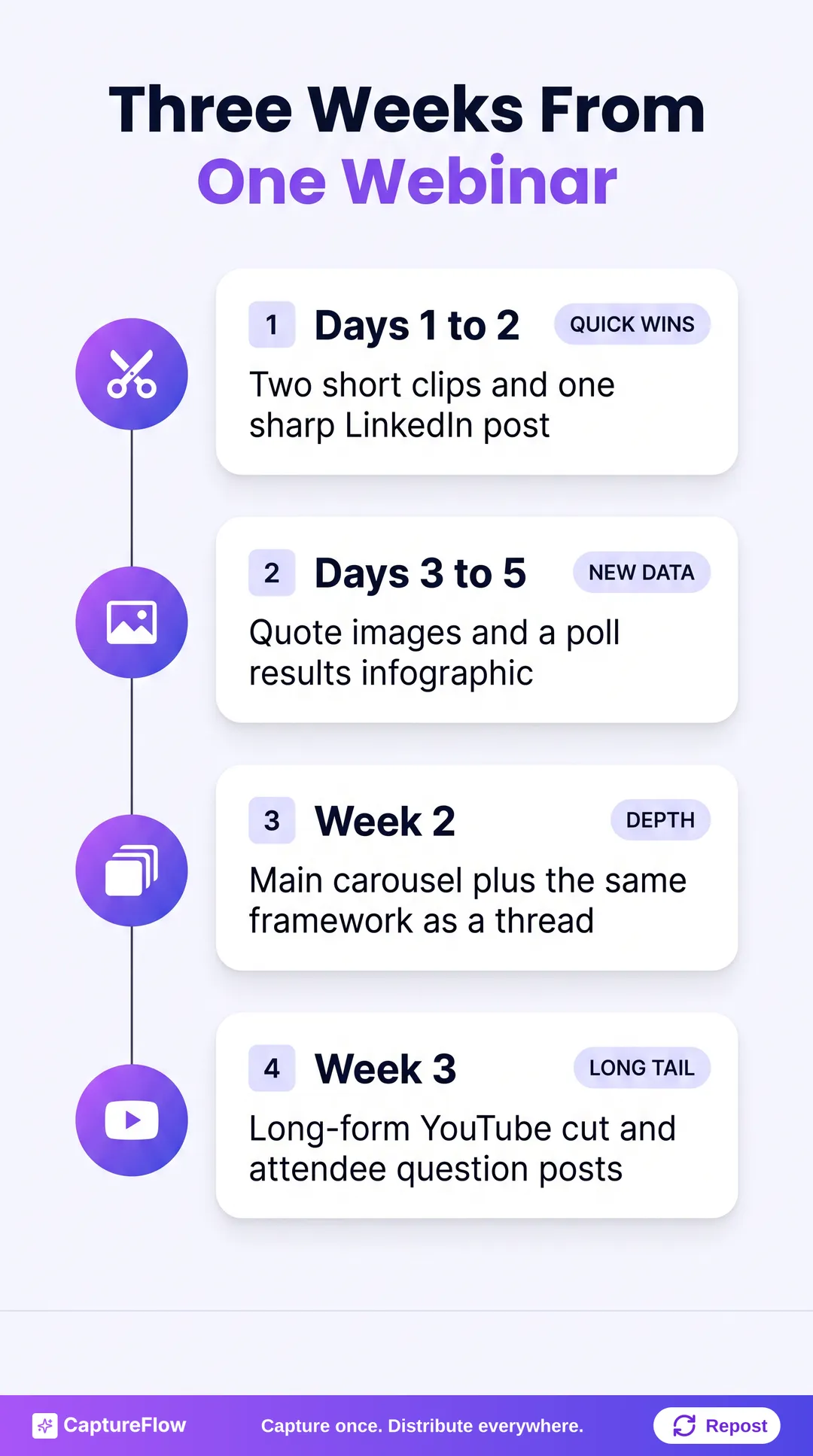 A three-week posting plan from one webinar.
- Days 1 to 2. Two short clips across TikTok, Reels, Shorts, and LinkedIn. One LinkedIn text post with the single sharpest take. Replay link in the comments.
- Days 3 to 5. Two or three quote images. A poll-results post or infographic (this is the one people share, because it's new data).
- Week 2. The main carousel on LinkedIn and Instagram. The same framework as a thread on X and Threads. Two attendee-question posts.
- Week 3. The long-form cut on YouTube. The second carousel. Remaining questions and clips, spaced out.
Drop the event framing after week one. "In last Tuesday's webinar" is a hook for a few days; by week three it's a reason to scroll past. The idea should stand on its own.
That's roughly 15 to 20 posts from one session. Run four to six webinars a year and you've covered a big slice of your calendar with content you already made.
Where CaptureFlow fits
Everything above works by hand. It also takes a few hours per webinar, which is exactly why most recordings end up in a shared drive nobody opens.
CaptureFlow is an AI content agent that turns your expertise into weeks of on-brand content for every platform. You upload the webinar recording (or the transcript, or the slides), and CaptureFlow, trained on your voice and past posts, pulls out the moments and reshapes them into native content for each channel: LinkedIn posts, X threads, carousels, quote images, infographics, and short video clips. You review the drafts, or leave it to your agent, and it schedules them across the calendar for you. The capture part takes about 5 minutes.
If you want to see the inputs it takes, the multimodal capture page covers video, audio, PDFs, slides, and links. The output side is on content formats.
A fair note on alternatives: if all you need is vertical clips, a dedicated clipping tool does that one job well. Where they stop is the text, the carousels, and the platform-by-platform rewrite. That's the part of webinar repurposing that eats the afternoon.
Related playbooks
Webinars sit in a family with other long-form sources. If you speak on stages too, the conference talk playbook runs a longer 12-week version of this system. For internal calls, see how to turn meeting recordings into content. And the content repurposing strategy guide covers the mindset behind all of it.
Your next webinar is probably already on the calendar. Decide now which three moments you'll clip, and see what CaptureFlow costs to have the rest drafted before the replay email goes out.
Sources
- ON24: 2025 Digital Engagement Benchmarks Report announcement
- Edelman and LinkedIn: 2025 B2B Thought Leadership Impact Report
- PLOS ONE: Murre and Dros, Replication and Analysis of Ebbinghaus' Forgetting Curve (2015)
- LinkedIn Help: Share a document in a post
Frequently asked questions
How much content can one webinar produce?+
A 45 to 60 minute webinar with a live Q&A usually gives you 15 to 25 usable moments. That's enough for three weeks of posts across LinkedIn, X, Threads, Instagram, TikTok, and YouTube, plus a carousel or two.
What should I repurpose first after a webinar?+
Short clips and quote images. They take the least effort, they reach people who never registered, and they go out while the topic is still fresh. Save the carousel and the long-form cut for week two and three.
Can I repurpose a webinar if a guest speaker said the best parts?+
Yes, with permission. Agree on clip and quote rights before the session, tag the guest when you post their moments, and send them the clips so they can post them too. Most guests are happy to get free assets.
Is it worth repurposing a webinar that had low attendance?+
Often more so. A small live audience means the content barely got seen. If the ideas were good, repurposing is how they finally reach the people who should have been in the room.
Chris is the founder and CEO of CaptureFlow, which he builds so founders can turn their expertise into content without hiring a team. After 10+ years building products and growing audiences from scratch, he writes about founder-led content, AI, and distribution from inside the problem he is solving: distributing consistent, on-brand content as a team of one.
Founder & CEO of CaptureFlow · 10+ years building products and audiences
One playbook a week from founders who actually create and distribute lots of content. No spam, unsubscribe anytime.
Keep reading
How to Repurpose a Conference Talk Into 3 Months of Content
You gave a 30-minute talk to a few hundred people, then posted one stage photo. Here is how to turn that same talk into 12 weeks of posts, clips, and carousels.
How to Turn a Slide Deck Into Social Content (No Video Needed)
Your old pitch decks and conference talks are a content backlog, not an archive. Here is how to mine one deck for a week of posts without ever turning on a camera.
How to Repurpose One Podcast Episode into 30 Posts
You already recorded an hour of gold. Most of it dies after one listen. Here is the exact system to turn one podcast episode into 30 native posts for every platform.