Pinterest for B2B: Evergreen Traffic Without Algorithm Anxiety
Pinterest for B2B works when you treat it as a visual search engine. What to pin, how to optimize for search, what to measure, and a 60-day plan.

Most B2B content has the shelf life of milk. You post on LinkedIn, reach spikes for two days, then it's gone and you start again on Monday. Pinterest for B2B is the rare channel that breaks that loop: it works when you treat it as a visual search engine for buyers who are researching a problem, and a good Pin can keep sending traffic for months after you publish it.
That's not marketing gloss. Pinterest's own help center says there's no set engagement window for Pins and that a Pin can gain traction hours, months, or even years after it goes up. Try finding that sentence in any other platform's docs.
This playbook covers why the platform rewards B2B content, what to pin (and what not to), how Pinterest SEO actually works, how to measure traffic instead of vanity, and a 60-day plan you can start this week with content you already have.
Pinterest for B2B is publishing useful, vertical graphics that answer your buyers' research questions, so Pinterest search sends them to your site long after you posted.
No virality in that definition. No daily posting treadmill either.
Why does Pinterest work for B2B?
Because people on Pinterest are searching, not scrolling. That one difference changes everything downstream.
Pinterest reported 661 million monthly active users in Q3 2026, an all-time high and up 10% year over year, with 107 million of them in the US and Canada. On its earnings call that quarter, the company said searches, boards created, and outbound clicks in its core US and Canada market all grew faster than users. People aren't only browsing more. They're looking for things and leaving to go get them.
And what they search for is rarely a brand. Pinterest says 96% of its top searches are unbranded. Nobody types your company name. They type "content audit checklist" or "sales onboarding process." That's the opening: a small B2B team can rank for a problem without first having to be famous.
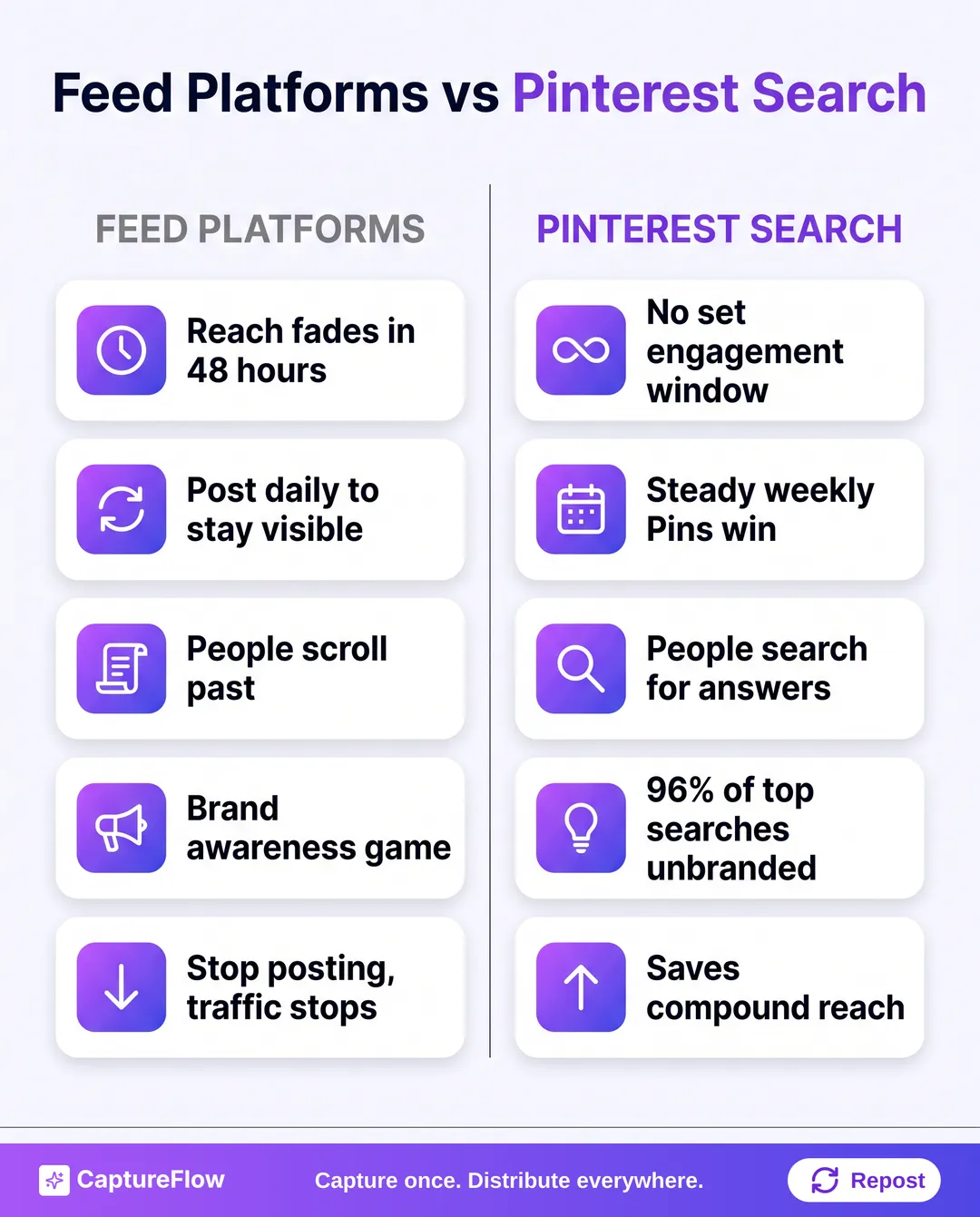 Feed platforms reward volume. Pinterest rewards relevance, and it keeps paying out.
Here's the mechanical part. When someone saves your Pin, Pinterest treats it as a signal the Pin is useful. In its own words, more saves earn you "a halo of additional reach over time". A feed post decays. A Pin that gets saved compounds.
Be honest about the audience before you invest. Pew's most recent Pinterest numbers found 50% of US women but only 19% of US men use it. If your buyer is a male-dominated engineering org, test small. If you sell to marketers, HR, people ops, design, or founders who plan visually, the odds are a lot better.
What B2B content actually works on Pinterest?
Pinterest has a content grammar, and most B2B experiments fail because they ignore it. The rule I use: if someone can't get value from the Pin image alone, without clicking, it isn't ready.
What earns saves:
- Infographics. The natural B2B format. A vertical graphic titled "The 5-step content audit" is exactly what someone saves for next quarter's planning.
- Process diagrams and frameworks. If you have a methodology, draw it. Your onboarding sequence, your pricing-page teardown model, your hiring scorecard. People collect these.
- Checklists. Show the first five items on the Pin and link to the full list on your site. The Pin delivers enough value to save; the page delivers the rest.
- Single-stat graphics. One strong number from your own research, big type, one line of context. Original data beats borrowed data here, same as everywhere.
- How-to step graphics. Three to six steps, linked to the deeper guide.
What wastes your time:
| Content type | Why it fails on Pinterest |
|---|---|
| Product screenshots | No save-for-later value; it reads as an ad |
| Company announcements | Nobody plans a project around your funding news |
| Blog header images | Pretty, but nothing to extract or keep |
| Stock photo plus tagline | Zero information density |
| Horizontal images | Pinterest's feed is vertical, so they shrink and get skipped |
Promotional content fades on Pinterest. Useful content compounds. Your job is to be the most saveable resource in your category, not the loudest brand in it.
How do you optimize Pins for Pinterest search?
Pinterest SEO isn't hard. It's just different from posting on a feed, and it rewards a bit of boring discipline.
Name boards like search queries
Boards aren't folders. Pinterest tells businesses to give every board a proper title and description because boards show up in search results too. "Marketing stuff" is invisible. "B2B content strategy templates" tells Pinterest exactly what lives there.
Build boards around your buyer's research questions, not your product categories. A sales-enablement startup might run "Sales onboarding checklists," "Cold email frameworks," "Sales coaching templates," and "B2B pipeline metrics." Each name is a keyword cluster your Pins inherit context from.
Write titles and descriptions for the algorithm
Pins get a title of up to 100 characters and a description of up to 800. Here's the part most people miss: Pinterest says descriptions don't even show in the home or search feed. They exist so the algorithm can judge relevance.
So write them like metadata, not captions:
- Lead with the phrase a buyer would actually search ("Content audit checklist for B2B marketing teams").
- Add two or three related phrases naturally, the synonyms and adjacent terms.
- Say plainly who it's for and what they'll get on the other side of the click.
- Make the landing page match. Pinterest explicitly asks that titles and descriptions accurately reflect the page you link to.
Design for a vertical screen
Pinterest's creative guidance recommends a 2:3 aspect ratio, or 1000 x 1500 pixels, and its spec pages warn that Pins taller than 2:3 can get cut off in the feed. Most of its audience is on mobile. Our image size guide keeps the current dimensions for every platform in one place, and the image resizer converts a square graphic you already made.
Keep the on-image headline short. Five to eight words that name the exact value: "7 steps to a quarterly content audit" beats "Content tips" every single time.
Post steadily, not in bursts
Pinterest recommends you create Pins frequently and consistently and add original content every week. It also warns that repeatedly re-saving the same Pins or re-uploading the same content can get flagged as spam. Its business blog goes further and says not to anchor on a specific number of Pins at all. Focus on the content.
My take: three good Pins a week, every week, beats thirty uploaded on a Sunday in a fit of ambition. If you want a sanity check on cadence across channels, our guide on how often to post on social media breaks it down by platform.
How do you measure Pinterest: traffic or impressions?
Traffic. Pinterest analytics will hand you big impression numbers almost immediately, and they mean very little. A Pin can sit in search results for weeks, rack up tens of thousands of impressions, and send nobody anywhere.
The numbers that matter:
| Metric | What it tells you |
|---|---|
| Outbound clicks | Real visits to your site |
| Saves | Future reach; Pinterest uses them as a relevance signal |
| Click-through rate per Pin | Whether the image and headline earn the click |
| Pinterest sessions and conversions (web analytics) | Whether the traffic does anything once it lands |
Tag every Pin link with UTM parameters, something like utm_source=pinterest&utm_medium=organic&utm_campaign=board-name. Our free UTM generator builds them in seconds. Then you can see in your analytics whether Pinterest visitors read, sign up, or bounce.
For individual Pins, I use a simple two-number read: saves and outbound clicks.
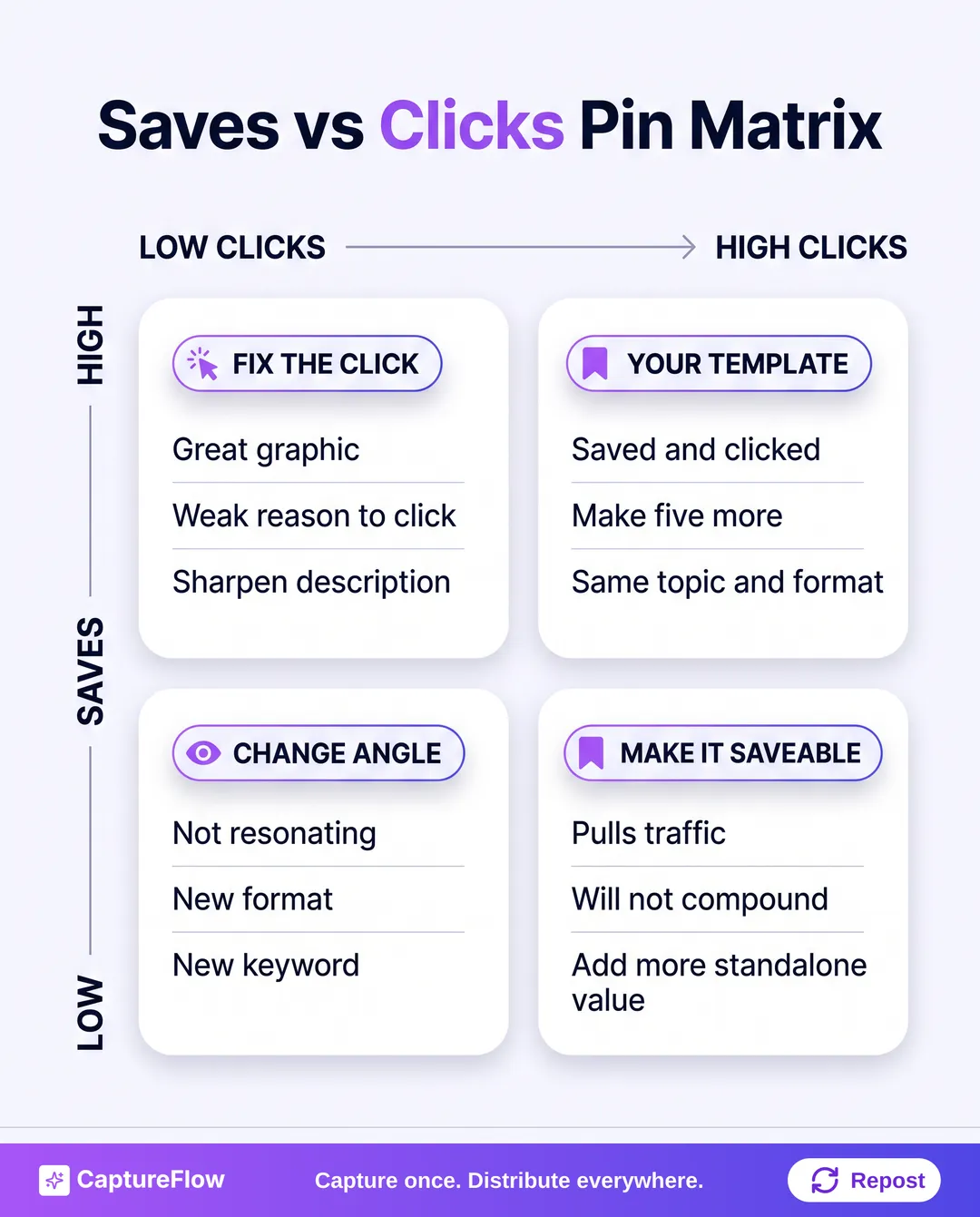 Two numbers per Pin tell you what to fix next.
- High saves, low clicks. The graphic is great; the reason to click isn't. Tighten the description and make the landing page promise clearer.
- High clicks, low saves. It's pulling traffic but won't compound. Make the image itself more useful to keep.
- Low on both. Wrong format or wrong keyword. Try a different angle rather than polishing it.
- High on both. That's your template. Make five more like it in the same topic.
Patience matters here. Pinterest is slow to start, and teams that judge it on LinkedIn's clock quit right before it starts paying out. Treat the first month as indexing time.
Which existing content should you pin first?
You don't need new content to start. You need to reformat what you have. Most B2B teams are sitting on a pile of Pin-ready material and don't know it.
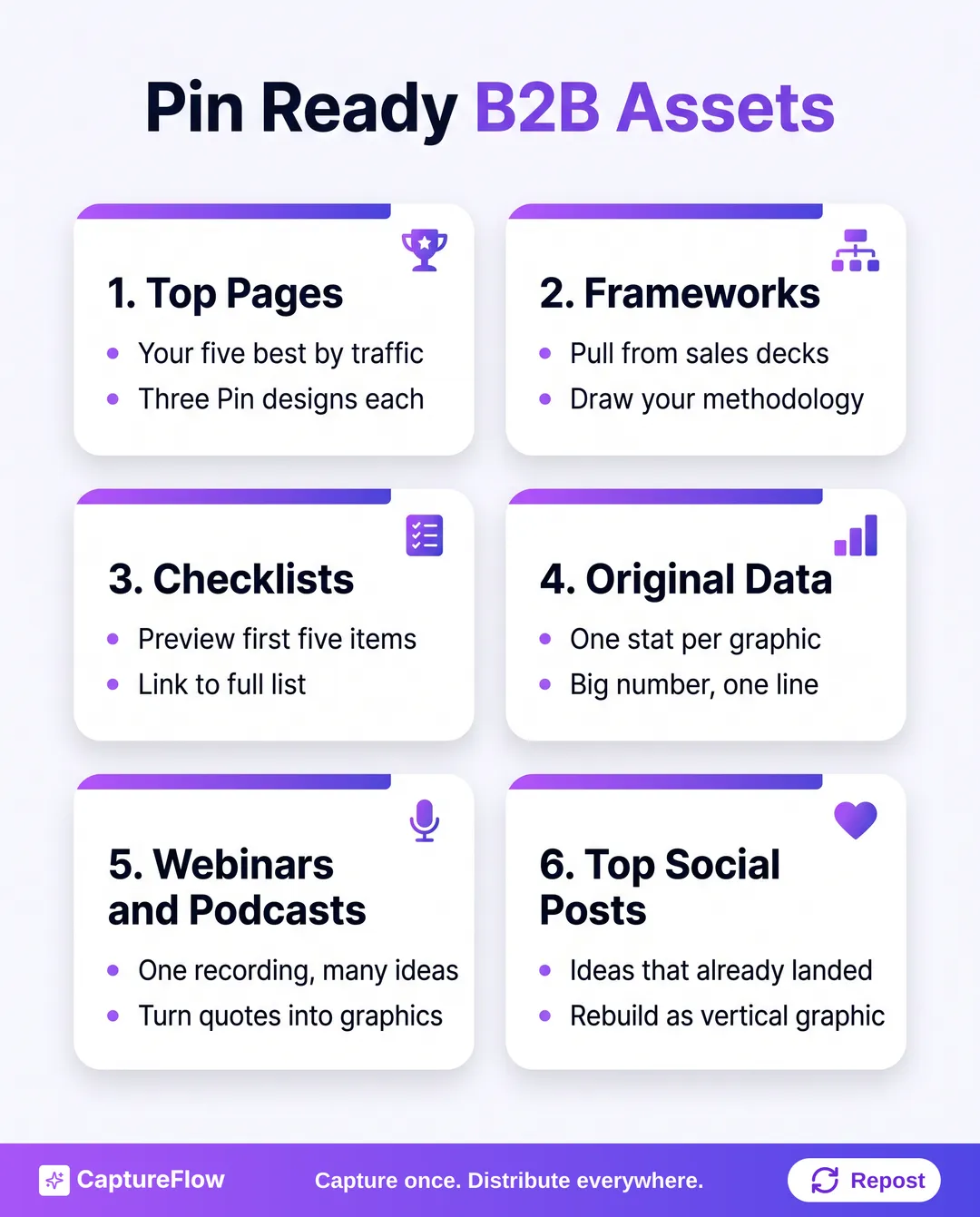 Start with what already works somewhere else.
Audit in this order:
- Your top five pages by organic traffic. Proven topics, new channel. Make two or three Pin designs per page, each pulling out a different takeaway.
- Any frameworks or diagrams already in decks. Sales decks and onboarding docs are full of them. If you've never done it, here's how to turn a slide deck into social content.
- Original data. One survey result or customer benchmark can become three stat graphics.
- Checklists and templates. Preview the first few items, link to the full version.
- Your best-performing LinkedIn posts. If a post's idea resonated there, it can work as a graphic here. Webinars and podcasts count too; one recording holds a dozen frameworks.
The repurposing math is friendly. Five pages times three Pin variations is 15 Pins, which is five weeks at three a week before you've created a single new idea. That's the same logic behind content atomization: one strong idea, many native formats.
This is also where an agent earns its keep. CaptureFlow is an AI content agent that turns your expertise into weeks of on-brand content for every platform. You capture one idea in 5 minutes (a voice note, a video, a file, or a link to an article you already published), and CaptureFlow reshapes it into native formats, including the infographics and quote images Pinterest rewards, then publishes to Pinterest alongside LinkedIn and the rest of your channels. See the full list of formats it produces.
Your 60-day Pinterest for B2B starter plan
Here's a plan that takes you from no presence to a working evergreen channel. It assumes a few hours a week, not a dedicated hire.
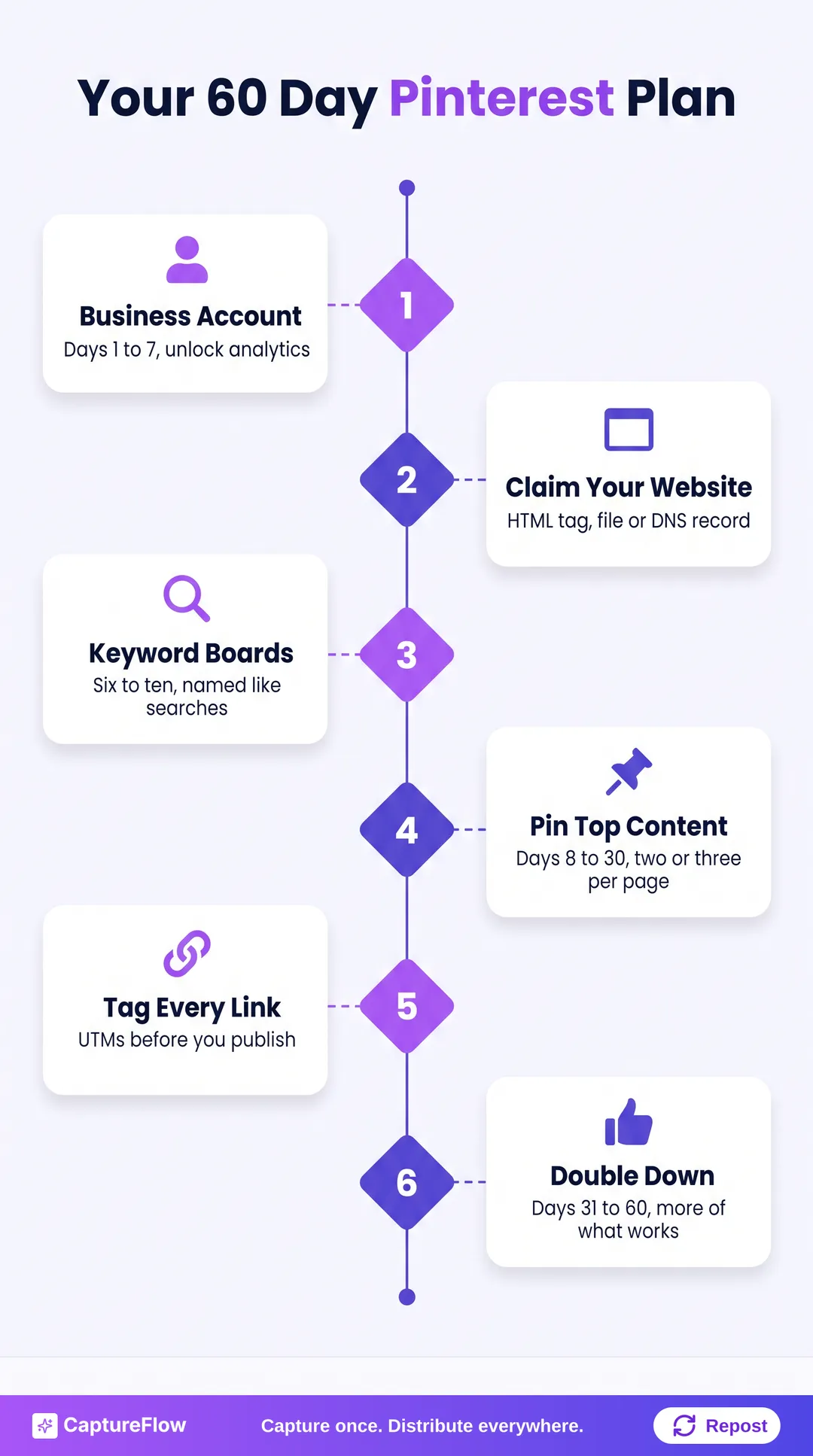 Foundation, build, then optimize. Don't skip the boring first week.
Days 1 to 7: foundation
- Set up a Pinterest business account (it unlocks analytics).
- Claim your website. Pinterest offers an HTML tag, an HTML file upload, or a DNS TXT record; the tag is fastest if you can edit your site.
- Write a profile bio about your buyer's problem, not your mission statement.
- Create six to ten boards named after real search queries, each with a description.
Days 8 to 30: build
- Run the asset audit above and design Pins for your top five pages, two or three each.
- Write a keyword-led title and description for every Pin, and make sure each one matches its landing page.
- Add UTM tags before you publish anything. Retrofitting them later is miserable.
- Publish a few original Pins a week, spread across boards.
Batch the design work. One afternoon a month turning your best ideas into vertical graphics beats trying to make a Pin from scratch every Tuesday. If you already batch your other channels, add Pinterest to the same session; here's our approach to batching a month of content.
Days 31 to 60: optimize
- At the end of week four, sort Pins by saves and outbound clicks and use the matrix above.
- Make more of whatever lands in "high on both."
- Check which search terms are bringing impressions, and add boards for the ones you didn't expect.
- At day 60, compare Pinterest sessions and conversions against your other organic channels in your analytics.
What does success look like at day 60? Not a viral moment. A short list of Pins that keep producing clicks without you touching them, and a clear sense of which formats to make more of. If you've got that, keep going. If saves and clicks are both flat after a couple of months of consistent, well-keyworded Pins, your buyers probably aren't researching there, and that's a perfectly good answer to have.
Stop feeding the feed. Build the asset.
Every other major platform asks you to keep feeding it. Stop posting, stop existing. Pinterest is the odd one out: the answer to "how do I get more traffic?" is less "post more" and more "post something worth finding, then let it work."
If you're already running LinkedIn, the B2B LinkedIn marketing guide pairs well with this, and we wrote a similar playbook for TikTok for B2B if short-form video is next. If you'd rather capture once and have the Pins, posts, and carousels drafted and distributed for you, take a look at CaptureFlow's pricing.
Sources
- Pinterest (SEC filing): Q3 2026 results press release
- Pinterest Q3 2026 earnings call: transcript
- Pinterest Business: Audience
- Pinterest Help Center: Pin performance and distribution
- Pinterest Help Center: Review Pin specs
- Pinterest Help Center: Claim your website
- Pinterest Business: Creative best practices
- Pinterest Business blog: How to build your audience on Pinterest
- Pew Research Center: How Americans use social media
Frequently asked questions
Does Pinterest work for B2B companies?+
It can, if your buyers research on their own and your expertise can be shown visually as frameworks, checklists, or process diagrams. Pinterest behaves like a search engine, and Pinterest says 96% of its top searches are unbranded, which favors useful educational content over brand awareness.
What B2B content performs best on Pinterest?+
Vertical, scannable graphics that deliver value on their own: infographics, step-by-step frameworks, checklists, and single-stat graphics that link to a deeper page on your site. Promotional posts and product screenshots rarely earn saves.
How long does Pinterest take to drive B2B traffic?+
Expect slow early weeks. Pins are indexed for search and keep getting distributed over time, so most teams need around two months of consistent posting before outbound clicks are a fair signal. That slow start is also why traffic lasts.
How often should a B2B brand post on Pinterest?+
Consistency beats volume. Pinterest recommends adding fresh content every week rather than chasing a fixed number, so a few original Pins a week is a sensible starting cadence for a small team.
What should B2B teams measure on Pinterest?+
Outbound clicks and saves per Pin, plus Pinterest sessions and conversions in your web analytics using UTM-tagged links. Impressions are easy to rack up and say little about whether the channel is working.
Chris is the founder and CEO of CaptureFlow, which he builds so founders can turn their expertise into content without hiring a team. After 10+ years building products and growing audiences from scratch, he writes about founder-led content, AI, and distribution from inside the problem he is solving: distributing consistent, on-brand content as a team of one.
Founder & CEO of CaptureFlow · 10+ years building products and audiences
One playbook a week from founders who actually create and distribute lots of content. No spam, unsubscribe anytime.
Keep reading
TikTok for B2B: What Actually Works (And What Wastes Your Time)
Most B2B teams wrote TikTok off years ago. The buyers didn't. Here is what actually works for B2B on TikTok, what burns your hours, and a 30-day test that tells you whether it is worth it.

Best Time to Post on TikTok in 2026 (Data-Backed)
TikTok is the one big platform where the weekend beats the workweek. Here is what the non-vendor data says about timing in 2026, and a 14-day test to find your own window.
LinkedIn Marketing for B2B Companies
For B2B, LinkedIn is not one channel among many. It is the channel. Here is how B2B companies actually win on it: the stack, the pillars, and the cadence.