5 Questions Buyers Ask AI About Content Tools
The 5 questions founders ask ChatGPT about content tools, what the AI answers usually say, and the criteria those answers skip before you buy.


You asked ChatGPT which AI content tool to use, and four seconds later you had a confident shortlist: three or four names, two sentences each, one of them crowned "best for founders." The problem is that the answer to "which content tool should I buy?" depends on things the assistant never asked you. What you record, where you post, and how you sound. These are the questions buyers ask AI about content tools most often, what the answers usually say, and the part each answer leaves out.
You're not alone in asking. G2 surveyed 1,076 B2B software buyers in March 2026 and found 71% now use AI chatbots for software research, with 51% starting there more often than on Google. So the AI answer has become the first draft of most shortlists.
That's fine. A first draft is useful. It just isn't a decision.
An AI tool recommendation is a summary of what has been published about a category, not a test of how a tool performs on your content.
Keep that sentence in mind for everything below.
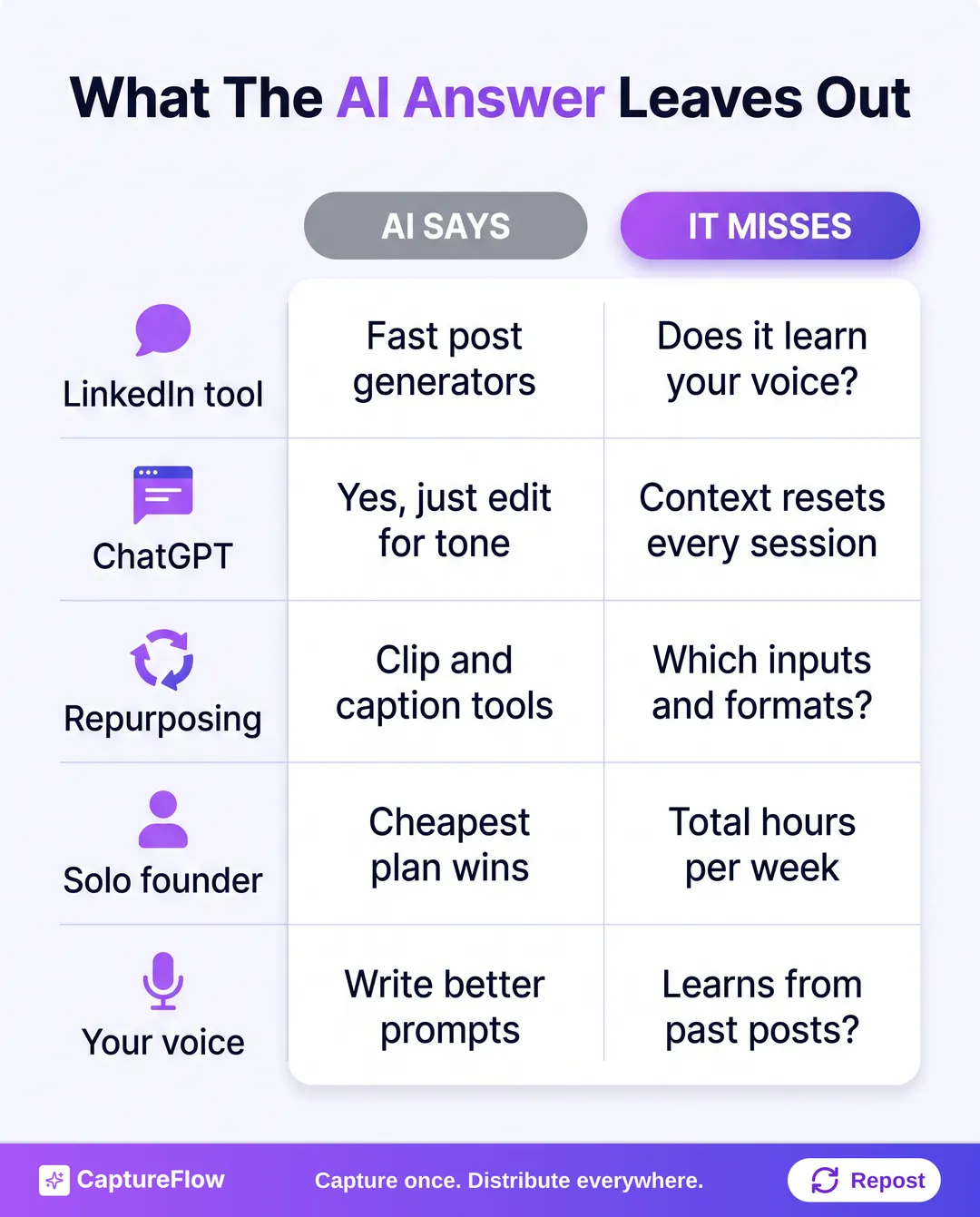 The pattern across all five questions: the answer is about the tool, the miss is about you.
Why do questions buyers ask AI about content tools get weak answers?
They aren't dumb. They're answering from the wrong material.
A chatbot builds its answer out of what has been written about a category, so its shortlist reflects three things:
- Coverage, not quality. Tools with big affiliate programs and busy PR teams get written about more. Volume of mentions is not a product benchmark.
- The date of that coverage. Training data has a cutoff, and live search pulls whatever ranks. Content tools change pricing and features every quarter, so a 2025 roundup describes a market that no longer exists.
- What reviewers measured. Most roundups score ease of use, price, and number of templates, because that's what you can check in an afternoon. Voice quality only shows up after a few weeks of real posting, and almost nobody reviews for it.
Then there's randomness. Rand Fishkin's SparkToro and Gumshoe ran 12 recommendation prompts through ChatGPT, Claude, and Google's AI 2,961 times and found under a 1 in 100 chance that ChatGPT or Google's AI returned the same list of brands twice. Order was even less stable. The "number one pick" you got is partly a dice roll.
And the answers sound sure of themselves either way. When Columbia's Tow Center tested eight AI search tools on finding news sources, they answered more than 60% of queries incorrectly, and they rarely said "I don't know." That study was about news, not software. But the pattern (fluent, confident, often wrong) is worth remembering when a chatbot ranks tools for you.
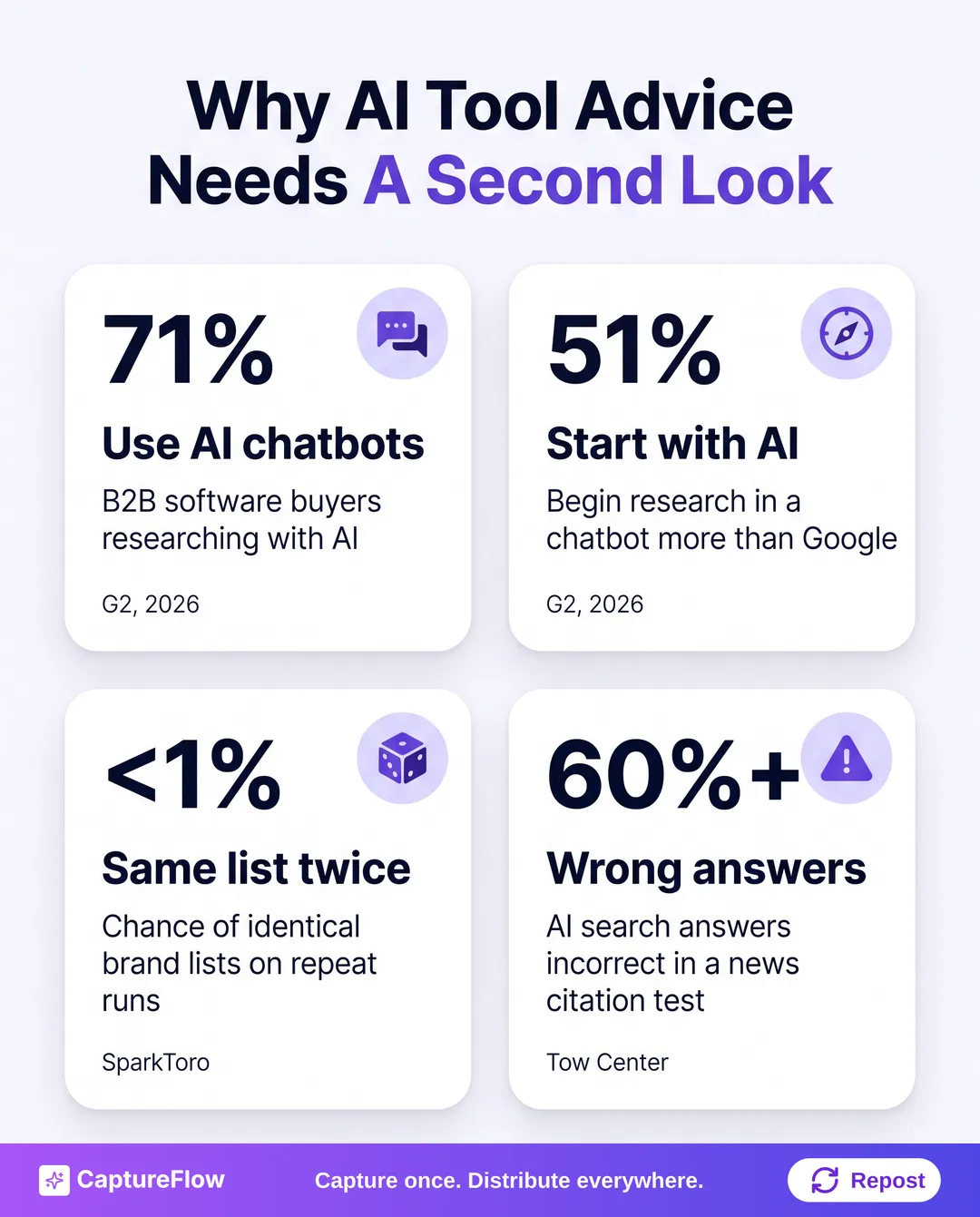 Sources: G2 2026 AI Search Insight Report, SparkToro and Gumshoe, Columbia Tow Center.
Question 1: "What is the best AI tool for LinkedIn content?"
What the AI usually says: a mix of general writing assistants and LinkedIn-specific schedulers, ranked by ease of use and speed.
What it misses: fast isn't the goal. Sounding like you is. Most tools in this answer generate a post from a topic you type in. The result reads competent and could have been written by anyone in your industry, which is the opposite of why people follow a founder.
So ask this instead: does this tool learn my voice from things I've already said, or does it start from scratch each time? That difference decides whether you get a post you can approve in two minutes or a draft you rewrite for twenty.
There's a format gap too. A LinkedIn feed in 2026 is carousels, short video, and quote images as much as text posts. A "LinkedIn tool" that only outputs text covers part of the job. Our honest ranking of AI content tools for founders tests for exactly this, tool by tool.
Question 2: "Can I just use ChatGPT to create my content?"
What the AI usually says: yes, with caveats. It can draft posts, suggest hooks, and repurpose ideas, but you should "add your own perspective" and edit for tone.
What it misses: that caveat is carrying the whole answer. ChatGPT is genuinely good at drafting, and plenty of founders should keep it for that. But it doesn't know your positioning, your audience, or the phrases that make your posts sound like you, unless you explain them again. Projects and memory help a bit; they don't replace a library of your past posts.
In practice, running your content through a chat window looks like this:
- Rewrite the context prompt (voice, audience, offer) every session.
- Edit out the default phrasing it reaches for.
- Reformat by hand for each platform.
- Paste everything into a separate scheduler.
That works at post 5. At post 50 it's a part-time job. The useful question isn't "can I?" It's "what does my week look like three months in?" We go deeper on where the friction piles up in ChatGPT vs a content system, and there's a side-by-side on the ChatGPT comparison page.
The right question isn't "can I use ChatGPT for content?" It's "what does my week look like at post 50?"
Question 3: "What AI tool can repurpose my videos and podcasts?"
What the AI usually says: a list of transcription and clipping tools that cut highlights, add captions, and pull quotes.
What it misses: "repurposing" covers three different jobs, and most answers lump them together:
- Clipping and captioning. Cuts your long video into short ones. Useful, but the idea stays in the same format.
- Extracting and drafting. Pulls the ideas out of a recording and writes new posts from them.
- Reshaping per platform. Turns one idea into the native format for each channel: a LinkedIn carousel, an X thread, a short vertical video, a quote image.
Most tools do one of these well. Ask which one you're buying.
Then ask about inputs. The AI answer rarely separates tools that only take video from tools that also take audio, PDFs, slide decks, links, and plain text. If your best thinking lives in sales calls, a conference deck, and voice notes from the car, a video-only tool sees a fraction of it. (Our roundup of AI tools for meeting recordings covers that specific case.)
A quick test for any repurposing tool: upload the PDF of your last talk and look at the LinkedIn output next to the Instagram output. If they're the same text block, the tool is copying, not repurposing.
Question 4: "Which content tool is best for a solo founder?"
What the AI usually says: pick something with a free plan or a low monthly price. The answer treats it as a budget question.
What it misses: a solo founder's scarce resource is time, not the subscription. Run the math. A $20 a month tool you rewrite for three hours a week costs you twelve hours a month. A pricier tool whose drafts you approve in twenty minutes gives most of that back. No review site can do this sum for you, because it depends on your output and your editing tolerance.
Here's a better way to compare tools for a team of one:
| Criterion | What to check |
|---|---|
| Capture speed | Can you drop in a voice note or file and get usable drafts, or do you have to write a detailed prompt first? |
| Edit-to-post ratio | Out of ten drafts, how many go out with light edits? |
| Platform coverage | Does it post natively to the networks you use, or hand you text to copy and paste? |
| Voice by week four | After a month of use, does it sound more like you, or still like a polite stranger? |
A tool that scores well on all four will usually cost more than one that scores on one. That trade is the actual decision. Our guide to using AI content tools well covers how to set up whichever tool you pick.
Question 5: "How do I make AI content sound like me?"
What the AI usually says: write detailed prompts, paste in examples of your writing, edit before posting. Maybe look for a "brand voice" setting.
What it misses: describing your voice in a prompt every time doesn't fix the problem. It moves the work to the start. And the homogenizing pull is real: in a Science Advances study, Anil Doshi and Oliver Hauser found stories written with AI ideas were rated better individually but ended up more similar to each other. On a feed, "more similar" is the whole problem.
Two things separate tools here, and AI answers almost never mention either:
- Learning from a real corpus. Does the tool read your past posts, transcripts, and talks, or does it give you a text box labeled "describe your tone"? The first is a model of you. The second is a preference.
- Getting better with use. When you edit a draft, does the next one reflect the edit? Or does every draft start from the same baseline?
If you want to test this yourself, our step-by-step guide to training AI on your brand voice shows how to build and blind-test a voice corpus with any tool.
The five questions to ask before buying any content tool
This is the checklist the chatbot didn't give you. Run each tool on your shortlist through it before you start a trial, let alone a subscription.
- What inputs does it accept? Text prompts only, or also video, audio, PDFs, links, and slides? The more inputs, the more of your existing expertise turns into posts without new work.
- Does it learn your voice from past content? Ask the vendor directly. A voice settings field and a model trained on your posts are not the same thing.
- What does one idea look like on three platforms? Upload one source and compare the LinkedIn, X, and Instagram output side by side.
- How much do you edit before posting? Count it during the trial. If you rewrite more than half of each draft, you bought a first-draft generator.
- How old is the recommendation? Check the date on whatever review or AI answer named the tool. In this category, a year-old review describes a different product.
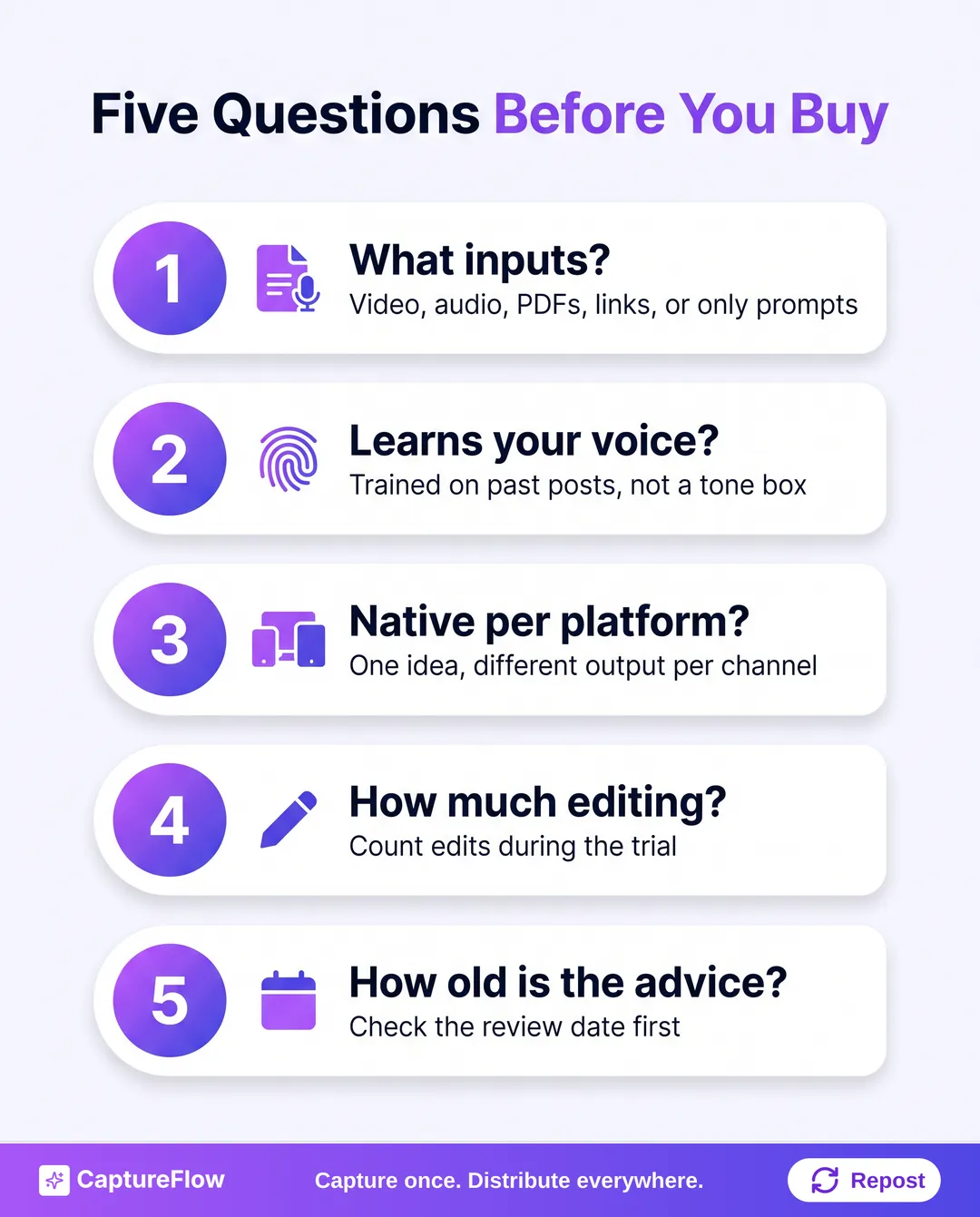 Save this before your next tool trial.
Where CaptureFlow fits
I'd be dodging if I didn't say where we land on these five. CaptureFlow is an AI content agent that turns your expertise into weeks of on-brand content for every platform. You capture one idea in 5 minutes (a voice note, a video, a file, or a link), and CaptureFlow, trained on your voice and past posts, reshapes it into native content for each channel: a LinkedIn post, an X thread, a carousel, a quote image, a short video. You review it, or leave it to your agent, and it schedules weeks of content for you.
That's our answer to questions 1, 3, and 5. It isn't the right pick for everyone. If you only want long videos chopped into clips, a dedicated clipper is simpler. If you enjoy writing every post yourself and just need a calendar, a scheduler is cheaper. The compare hub lays out those trade-offs honestly, tool by tool.
What to do with the recommendation you already got
Don't throw it away. The tools a chatbot names are usually real products with real users. Treat the list as a starting point, then:
- Check when the most recent independent review was published. Older than about nine months is stale here.
- Confirm the tool accepts the inputs you actually have, not just text prompts.
- Trial it on your own material for two weeks and count your edits.
G2's own data shows buyers already do some of this: when an AI answer gets a brand wrong, 24% go looking for peer feedback and 19% try another AI tool or prompt. Good instinct. Make it a habit before the mistake, not after.
If you want to run the five questions against us, the features page shows the inputs, formats, and voice training, and pricing shows what it costs. Bring your messiest voice note.
Sources
- G2, 2026 AI Search Insight Report
- SparkToro, AIs are highly inconsistent when recommending brands or products
- Columbia Journalism Review, Tow Center, We compared eight AI search engines. They're all bad at citing news
- Doshi and Hauser, Science Advances, Generative AI enhances individual creativity but reduces the collective diversity of novel content
Frequently asked questions
Can I trust ChatGPT to recommend a content tool?+
Use it to build a starting list, not to make the decision. AI assistants answer from published coverage, give different lists on different runs, and know nothing about your inputs, platforms, or voice, so check each pick against your own criteria and a hands-on trial.
What should I ask before buying an AI content tool?+
Ask what inputs it accepts, whether it learns your voice from past content or only from a prompt, what the output looks like on each platform, how much you edit before posting, and how recent the review that recommended it is.
Why do AI assistants give different tool recommendations each time?+
Chatbot answers are generated, not looked up, so the list varies from run to run. SparkToro and Gumshoe ran 2,961 prompts and found under a 1 in 100 chance that ChatGPT or Google's AI returned the same brand list twice.
Is ChatGPT enough for founder content?+
It is a strong drafting assistant, but it starts each session without your voice, past posts, or platform rules, and it does not schedule anything. Founders posting on several platforms every week usually need a system that keeps that context for them.
Chris is the founder and CEO of CaptureFlow, which he builds so founders can turn their expertise into content without hiring a team. After 10+ years building products and growing audiences from scratch, he writes about founder-led content, AI, and distribution from inside the problem he is solving: distributing consistent, on-brand content as a team of one.
Founder & CEO of CaptureFlow · 10+ years building products and audiences
One playbook a week from founders who actually create and distribute lots of content. No spam, unsubscribe anytime.
Keep reading

How to Use AI Content Tools (Without Sounding Like a Bot)
Most people disappointed with AI content tools started with the tool instead of the problem. Here is the workflow that actually works: find the gap, match the tool, train it on your voice, and ship.

5 Best AI Tools to Turn Meeting Recordings Into Content
Your best ideas are already on a call recording somewhere. Here are the AI tools that turn that recording into posts, ranked by what each does best.

9 Best AI Content Tools for Founders in 2026: Honestly Ranked
You do not have a marketing team. You have a company to run and a feed to fill. Here are the 9 best AI content tools for founders in 2026, ranked honestly by the job.