How to Write a LinkedIn Post That Gets Engagement (Templates)
How to write a LinkedIn post that gets engagement, with the anatomy of a strong post, 5 fill-in-the-blank templates, and a 5-minute system to post consistently.


Most LinkedIn posts read like a memo nobody asked for.
That is the real reason they get ignored. Not because the idea was bad, but because the writing treated the feed like a filing cabinet instead of a room full of people. The feed is closer to a party than a document. Nobody stops for a slide deck. They stop for the person telling a good story in the corner, in plain language, one line at a time.
This guide is about how to write a LinkedIn post that earns the stop. First, what a strong post actually is. Then the five-part anatomy behind every LinkedIn post that gets engagement. Then five LinkedIn post templates you can steal today, each with a fill-in-the-blank skeleton, and a five-minute system for writing your own.
I run CaptureFlow, so this is my daily work. CaptureFlow is an AI content agent that turns your expertise into weeks of on-brand content for every platform. But you do not need a tool to write a good post. You need to understand the shape of one.
What a strong LinkedIn post actually is
A strong LinkedIn post is one clear idea, opened with a scroll-stopping first line, written in short lines that are easy to read on a phone, and closed with a soft invitation to reply.
That is the whole definition. Not clever. Not viral. Clear.
The most common mistake is trying to say five things in one post. A post that argues one point and lands it beats a post that lists five and lands none. Pick the single idea you would tell a friend over coffee, then build everything around making that one thing land.
The anatomy of a post that gets engagement
Every post that works has the same five parts, in the same order. Learn the anatomy once and you will see it in every post that ever made you stop.
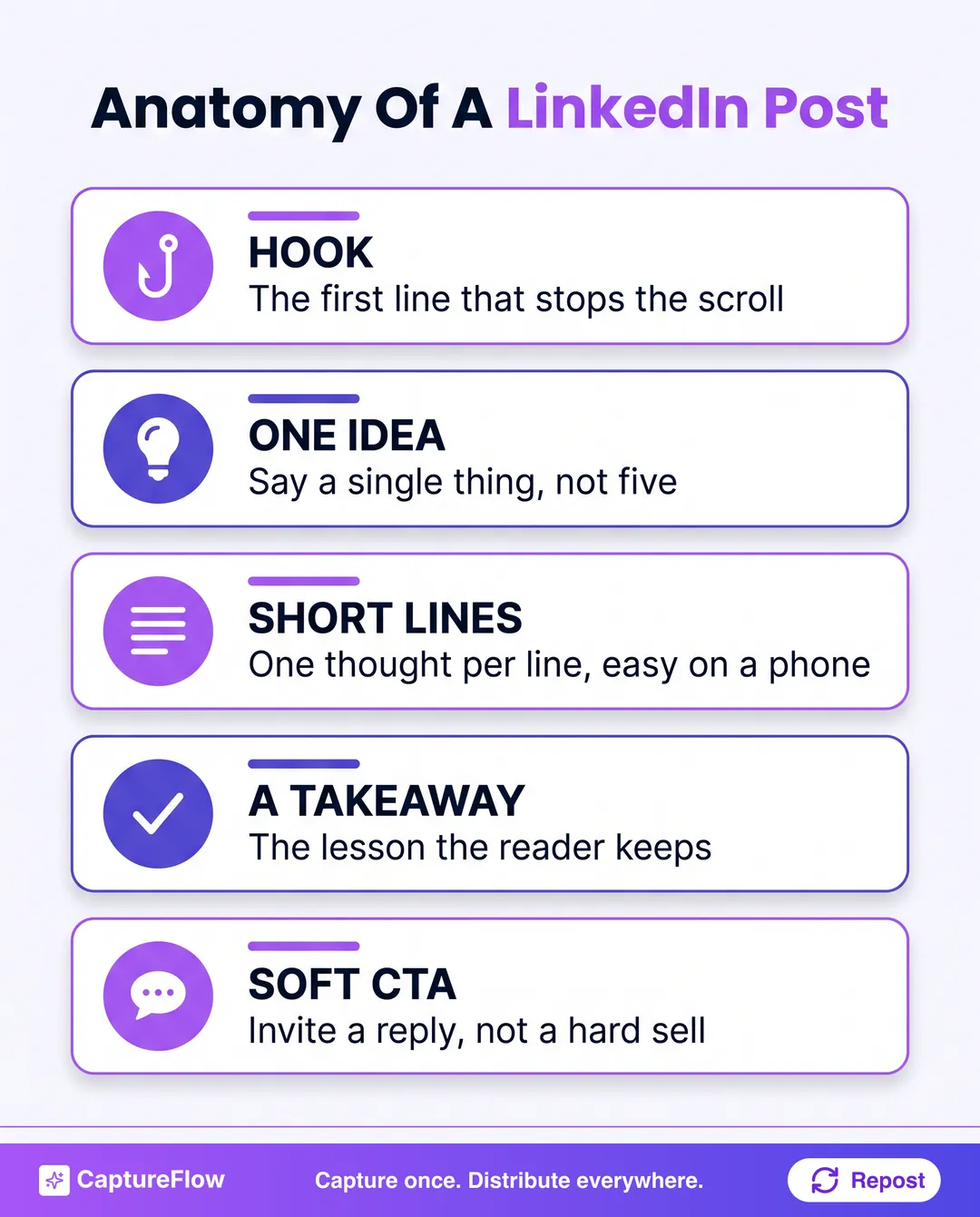 Five parts, in order. Miss one and the post flattens out.
- The hook. Your first line is the only line the feed guarantees anyone sees. On mobile, LinkedIn cuts most posts off after a line or two and hides the rest behind "see more". So line one is not an intro, it is a tripwire. Open on the sharpest, most specific thing you have and cut the warm-up. If you want a deeper drill on this one part, we wrote a whole guide on how to write LinkedIn hooks.
- One idea. Say a single thing. The post exists to make that one point land, not to empty your notebook. If a sentence does not serve the idea, cut it.
- Short lines. Write one thought per line with real white space between them. People do not read the feed, they scan it, and decades of eye-tracking from the Nielsen Norman Group show readers take in only about a quarter of the words on a page. A wall of text tells the eye to keep scrolling. Short lines give it a reason to stay.
- A takeaway. Give the reader one thing to keep. A lesson, a reframe, a rule they can use on Monday. If they cannot repeat your point in a sentence, there was no point.
- A soft CTA. End by opening a door, not closing a sale. A genuine question ("What would you have done?") invites replies, and replies are what tell the LinkedIn algorithm your post is worth showing to more people. "DM me to buy" ends the conversation before it starts.
The single biggest upgrade to most posts is not more words, it is more line breaks. Take your draft, put every sentence on its own line, and delete the three or four that do not serve the one idea. Nine times out of ten it reads better instantly.
5 LinkedIn post templates you can steal
The blank page is the real enemy. You do not have a writing problem, you have a starting problem. So do not start from nothing. Start from a shape that already works, then pour your own specifics into it. If the shape is not your problem but the idea is, steal from these 50 LinkedIn content ideas.
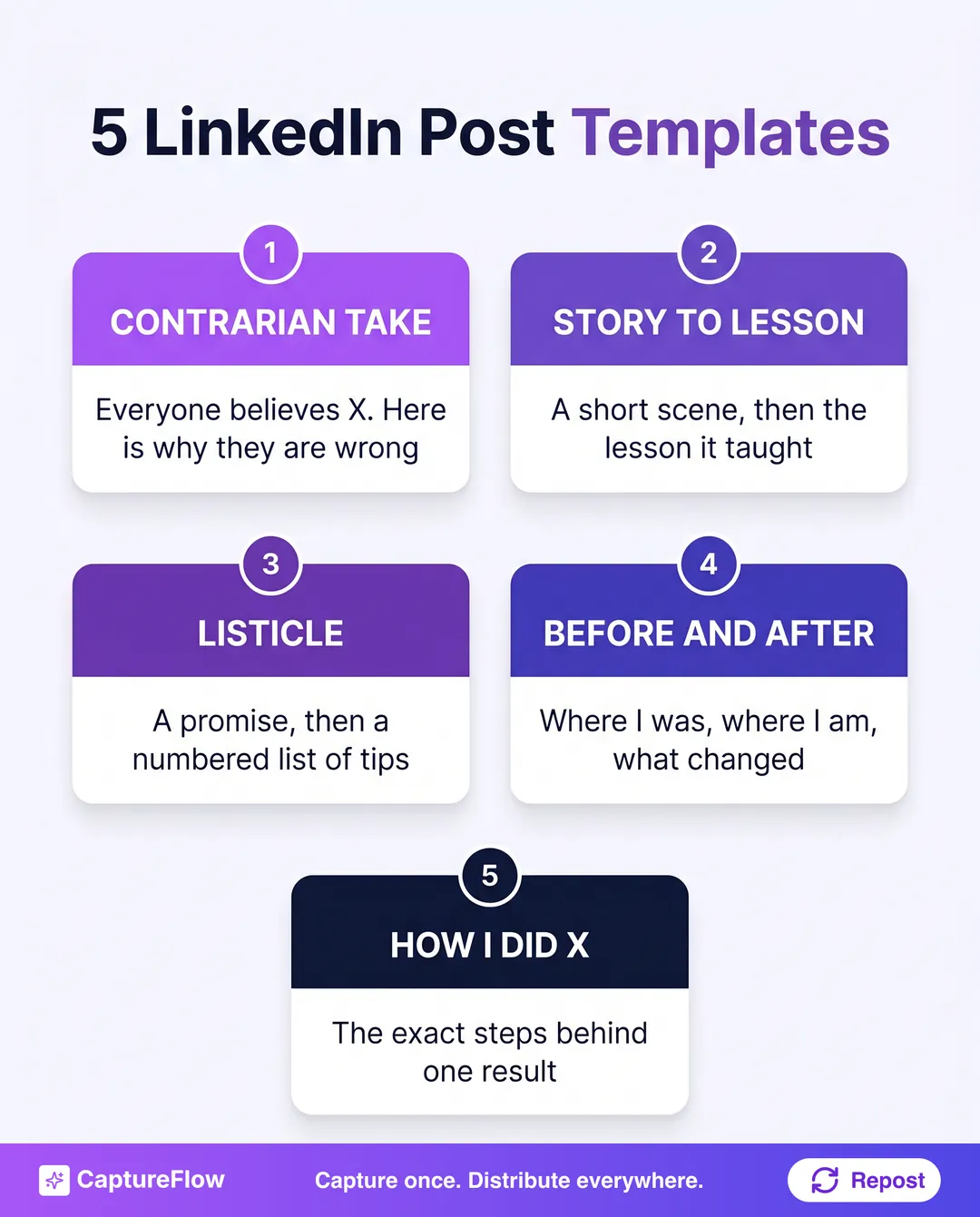 Five shapes that never stop working. Swap in your own specifics and the template disappears.
Here are five reliable LinkedIn post templates, each with a skeleton you fill in.
1. The contrarian take
Disagree with something your audience takes for granted. The tension is built in, because the reader has to find out whether you are right.
Everyone says [common advice].
I did the opposite and [surprising result].
Here is what actually [worked / mattered / happened]:
[2 to 3 short lines of reasoning.]
[The takeaway, stated plainly.]
Am I wrong?
2. The story to lesson
Open in the middle of a scene, then pull one lesson out of it. Narrative is the most reliable way to keep someone reading to the end.
[A specific moment. A time, a place, a person.]
[What happened next, in short beats.]
[The turn, the thing that surprised you.]
What it taught me: [one clear lesson].
Has this ever happened to you?
3. The listicle
Make a promise, then deliver it as a scannable numbered list. This format works because the reader can see the payoff coming.
[N] things I wish I knew about [topic] before [milestone]:
- [Point, one line.]
- [Point, one line.]
- [Point, one line.]
[The one that matters most, and why.]
Which would you add?
4. The before and after
Show the gap between where you were and where you are. Transformation is the most shareable shape there is, because it is proof that change is possible.
[Time ago] I was [painful before state].
Today I [better after state].
Here is what changed:
[The one habit, decision, or system that did it.]
[What you would tell someone still in the before.]
5. The how I did X
Take one concrete result and reverse-engineer it into steps. Specific and useful beats broad and inspirational every time.
How I [specific result] in [timeframe]:
[Step 1, one line.]
[Step 2, one line.]
[Step 3, one line.]
The part most people skip: [the non-obvious step].
Want the full breakdown?
The rule under all fiveA template is not a script. It is a shape. The structure is borrowed, but the story, the number, and the opinion have to be yours, or the reader smells the template through the words.
The difference between a post that gets scrolled past and one that gets replies usually is not the idea. It is whether the idea was given a shape. Here is the same thought written two ways.
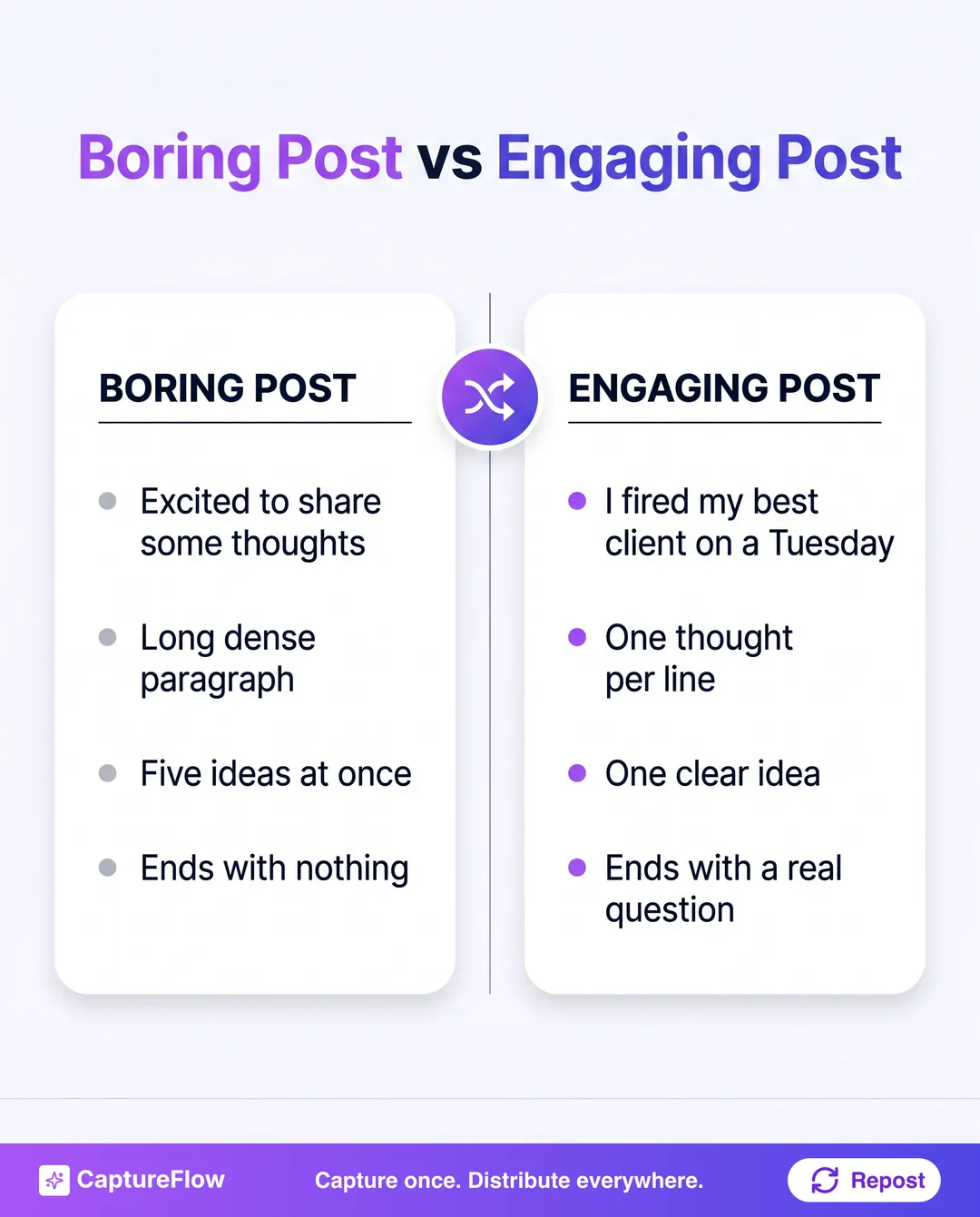 Same writer, same topic. The right column just gave the idea a shape.
How to write a LinkedIn post in 5 minutes
You do not need to be a copywriter. You need a repeatable move.
1. Pick the idea, not the post. In one sentence, what is the single thing you want someone to walk away with? If you cannot say it in a sentence, you are not ready to write it. Start there, not with the opening line.
2. Pick a template. Match your idea to one of the five above. Have a spicy opinion? Contrarian. A moment that taught you something? Story to lesson. A result you are proud of? How I did X. The template decides the shape so you do not have to.
3. Fill the skeleton fast. Write the whole thing in one pass without editing. Do not polish, do not judge, just get your specifics into the slots. A rough full draft beats a perfect first line and nothing under it.
4. Fix the hook and the lines. Now go back to line one and make it the most specific, surprising sentence you have. Then break every sentence onto its own line. This step alone does most of the work.
5. End with a real question. Delete any hard sell and replace it with one genuine question you actually want answered. That is the soft CTA that earns replies.
Stuck on the first line? Our free hook generator will write 10 opening lines from your topic in seconds, one per style, so you react to options instead of a blank box. Pick the sharpest and build the post under it.
Five minutes, five steps, and you have a post with a shape instead of a shrug. Do this a few times and the anatomy becomes automatic.
If even five minutes is more than your week has room for, that is exactly what we built the tool for. Our free LinkedIn post generator will generate a full post from your idea in seconds, hook and short lines and soft CTA already in place, so you edit instead of stare. It is the same instinct behind turning one video into 10 LinkedIn posts: the raw material is already yours, the tool just gives it a shape. For a wider look at what is out there, see our roundup of the best AI LinkedIn content tools.
Stop staring at the empty box
Writing a LinkedIn post that gets engagement is not a talent you either have or you do not. It is a move: pick one idea, pick a template, fill the skeleton, fix the hook, end with a question.
Do that on your next post and watch the replies come in. Or skip the blank box entirely: generate a full post from your idea in seconds with our free tool, then start a free trial and let your content agent draft weeks of posts in your voice while you approve them.
Sources
- Nielsen Norman Group, "How Little Do Users Read?" and "First 2 Words: A Signal for the Scanning Eye"
Frequently asked questions
How do you write a LinkedIn post that gets engagement?+
Start with one idea, not five. Open with a specific first line that earns the 'see more' tap, write in short one-thought-per-line sentences that are easy to read on a phone, land a single takeaway, and end with a soft question that invites a reply. Pick a template so you are never starting from a blank page.
How long should a LinkedIn post be?+
There is no magic number, but most strong posts run between 100 and 300 words. What matters far more than length is that the first line is sharp and the lines are short. A tight 120-word post beats a rambling 400-word one every time.
What should the first line of a LinkedIn post be?+
The most specific, surprising, or honest sentence you have, because it is the only line the feed shows before 'see more'. Skip the warm-up like 'Excited to share' and open on the sharpest thing in your draft.
Do LinkedIn post templates make you sound generic?+
Only if you leave the template generic. The structure is proven, but the specifics have to be yours: your real numbers, your real story, your real opinion. A template removes the blank-page friction so you can spend your energy on the substance.
Chris is the founder and CEO of CaptureFlow, which he builds so founders can turn their expertise into content without hiring a team. After 10+ years building products and growing audiences from scratch, he writes about founder-led content, AI, and distribution from inside the problem he is solving: distributing consistent, on-brand content as a team of one.
Founder & CEO of CaptureFlow · 10+ years building products and audiences
One playbook a week from founders who actually create and distribute lots of content. No spam, unsubscribe anytime.
Keep reading

How to Write LinkedIn Hooks That Stop the Scroll (30 Examples)
A great LinkedIn post dies on line one if the hook is boring. Here is how to write LinkedIn hooks that stop the scroll, with 30 examples across 10 styles.

What Drives LinkedIn Engagement: 2,500 Posts Analyzed
We pulled the public LinkedIn history of 25 founders, 2,500 posts in total, to build our playbook teardowns. The engagement pattern hiding in that data surprised us.

LinkedIn Content Ideas: 50 Posts to Steal When You're Not an Influencer
You are not out of things to say, you are out of shapes to say them in. Here are 50 specific LinkedIn content ideas, organized into 6 buckets, that you can post starting today.